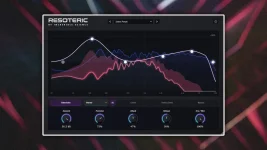
Dissolvia is a free Windows 64-bit VST3 reverb with zero reported samples of latency, 50 presets, wet-only EQ, and stereo width controls. Its main controls are Size, Texture, Motion, Width, Feedback, and Pressure, which make the interface feel closer to a sound-shaping tool than a room simulator.
The useful bit is how those controls divide the job. Size changes the sense of scale; Texture and Motion push the tail toward more animated behavior, while Feedback and Pressure decide how strongly the space builds and hangs around. You can get from a short ambience to a much larger wash without constructing a separate modulation chain.
Dissolvia belongs to the four-plugin Incredible Science VST3 collection, but its appeal is less about the lineup and more about how quickly a dry sound can become wide and active without obvious repeated echoes.
The general DSP idea is not exotic. Time-varying feedback matrices in artificial reverberation show how continuous modulation inside a reverberation network can increase the perceived liveliness of a tail while avoiding obvious artifacts. Incredible Science does not publish Dissolvia's internal topology, so it would be a stretch to claim it uses the same method, but Motion and Texture are clearly aimed at the same practical goal of keeping the space from feeling frozen.
This is also where Dissolvia differs from Filteria. Filteria builds movement through individually modulated filters, pitch processing, and reorderable effects, while Dissolvia keeps the movement inside a much simpler reverb-focused control set. You spend less time designing the modulation system and more time deciding how restless the tail should feel.
Pressure is worth treating carefully. More density or persistence can sound impressive in solo, then turn a busy chorus into soup once vocals, cymbals, pads, and delays all hit the same space. A lower setting often leaves more room for the source attack while still giving the tail enough motion to sound alive.
The same logic applies at the top end. A bright tail can help a pad feel open, but the same brightness behind a sharp vocal may exaggerate consonants and cymbal spill. Cutting the wet return lets the original articulation stay where it was while the ambience moves backward.
Wet-only EQ is different from changing the decay mechanism itself. Reverb damping can alter how frequencies decay inside the reverb process, while output EQ simply shapes what comes out afterward. Dissolvia gives you the latter kind of control, which is useful when the space works but its finished tone does not.
This also makes send use straightforward. Run Dissolvia fully wet on an auxiliary return, shape the tail there, and keep the dry track untouched on its original channel. Insert use still works, but a send makes it easier to judge whether the reverb itself is too dark, too bright, or simply too loud.
Width deserves the same practical treatment. The developer describes the stereo processing as phase-conscious, but wide ambience should still be checked in mono because stereo detail naturally changes when left and right collapse together. A wet reverb can narrow in mono without actually being broken, so the useful test is whether the source loses body or the tail simply becomes less spacious.
Start with Width lower than the preset suggests if the mix already contains doubled vocals, stereo synths, or wide delays. Push it only until the reverb creates separation around the source. Once the center starts feeling weaker or the tail becomes the widest thing in every section, the control has stopped helping the arrangement.
The useful bit is how those controls divide the job. Size changes the sense of scale; Texture and Motion push the tail toward more animated behavior, while Feedback and Pressure decide how strongly the space builds and hangs around. You can get from a short ambience to a much larger wash without constructing a separate modulation chain.
Dissolvia belongs to the four-plugin Incredible Science VST3 collection, but its appeal is less about the lineup and more about how quickly a dry sound can become wide and active without obvious repeated echoes.
Moving tails can stay lively without sounding metallic
Reverb gets boring fast when every part of the tail behaves exactly the same way. Small changes over time can stop a dense decay from settling into an obvious static pattern, especially on sustained vocals, pads, guitars, and synths.The general DSP idea is not exotic. Time-varying feedback matrices in artificial reverberation show how continuous modulation inside a reverberation network can increase the perceived liveliness of a tail while avoiding obvious artifacts. Incredible Science does not publish Dissolvia's internal topology, so it would be a stretch to claim it uses the same method, but Motion and Texture are clearly aimed at the same practical goal of keeping the space from feeling frozen.
This is also where Dissolvia differs from Filteria. Filteria builds movement through individually modulated filters, pitch processing, and reorderable effects, while Dissolvia keeps the movement inside a much simpler reverb-focused control set. You spend less time designing the modulation system and more time deciding how restless the tail should feel.
Pressure is worth treating carefully. More density or persistence can sound impressive in solo, then turn a busy chorus into soup once vocals, cymbals, pads, and delays all hit the same space. A lower setting often leaves more room for the source attack while still giving the tail enough motion to sound alive.
Wet-only EQ keeps the source out of the repair job
Dissolvia's interactive EQ processes the wet signal without changing the original dry sound. This matters more than it first appears. If the reverb gets muddy around the low mids, you can trim the return without thinning the vocal, synth, or guitar that generated it.The same logic applies at the top end. A bright tail can help a pad feel open, but the same brightness behind a sharp vocal may exaggerate consonants and cymbal spill. Cutting the wet return lets the original articulation stay where it was while the ambience moves backward.
Wet-only EQ is different from changing the decay mechanism itself. Reverb damping can alter how frequencies decay inside the reverb process, while output EQ simply shapes what comes out afterward. Dissolvia gives you the latter kind of control, which is useful when the space works but its finished tone does not.
This also makes send use straightforward. Run Dissolvia fully wet on an auxiliary return, shape the tail there, and keep the dry track untouched on its original channel. Insert use still works, but a send makes it easier to judge whether the reverb itself is too dark, too bright, or simply too loud.
Zero latency makes the width controls easier to trust
Dissolvia reports zero samples of plugin latency. A DAW still has audio-buffer and system latency, of course, but the reverb itself is not adding another reported processing delay on top. Tracking a vocal or playing a software instrument through it should therefore feel much less disconnected than a high-latency effect chain.Width deserves the same practical treatment. The developer describes the stereo processing as phase-conscious, but wide ambience should still be checked in mono because stereo detail naturally changes when left and right collapse together. A wet reverb can narrow in mono without actually being broken, so the useful test is whether the source loses body or the tail simply becomes less spacious.
Start with Width lower than the preset suggests if the mix already contains doubled vocals, stereo synths, or wide delays. Push it only until the reverb creates separation around the source. Once the center starts feeling weaker or the tail becomes the widest thing in every section, the control has stopped helping the arrangement.