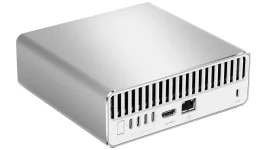
MSI lists the EdgeMesa N AI+ with up to 128GB of LPDDR5X unified memory shared by its Grace CPU and Blackwell GPU. It sounds like somebody stuffed workstation-class VRAM into a tiny Windows box, but the number needs a bit of unpacking. You are looking at one physical memory pool, not a graphics card with a private 128GB memory bank.
The practical distinction matters once you start loading local models. The EdgeMesa N AI+ RTX Spark hardware can let the CPU and GPU work from the same physical DRAM, but Windows and NVIDIA still divide that pool into logical regions with different jobs and limits.
The word dedicated is slightly weird here because the carveout is still physically backed by system DRAM. Windows reports it much like VRAM, while the shared region sits beside it as memory available to both sides. Your 128GB machine therefore does not present every installed byte as one giant GPU allocation target.
NVIDIA goes further and spells out how the shared portion is sized. After the GPU carveout is reserved, the nominal shared pool is the remaining capacity minus 16GB, with Windows keeping the result within a range of 50 to 80 percent of the post-carveout memory. The exact usable amount can also move with system pressure.
This is why screenshots from different utilities can look contradictory without anything actually being broken. NVML can report the dedicated carveout, CUDA can report a combined dedicated-and-shared budget, and DirectX exposes its own view of local budget and usage. Comparing those numbers as though they all mean VRAM is an easy way to confuse yourself.
NVIDIA explicitly warns developers not to consume the whole reported GPU budget. A workload can leave too little host memory for Windows and make the system unresponsive even though the GPU-facing tools still appear to show available capacity. Bigger shared memory is useful, but allocating every available gigabyte is still a bad idea.
The same engineering problem shows up in integrated CPU-GPU memory work on Grace Hopper. Shared physical memory can cut down the old routine of copying data between separate CPU and GPU pools, while placement, page behavior, bandwidth, and access patterns still affect performance.
RTX Spark also treats GPU-exclusive and CPU-GPU-shared allocations differently. GPU-heavy CUDA allocations start in the dedicated segment and can spill into shared memory after the carveout fills, while coherent allocations used by both processors land in the shared segment. NVIDIA even advises against leaning on cudaMallocManaged here because its compatibility path can cost performance.
So a 70GB model on a 128GB EdgeMesa does not automatically leave 58GB safely available for everything else. The runtime may need additional GPU allocations, the CPU needs free capacity, and longer context can push memory use upward after the model has already loaded. Quantization changes the equation again because smaller weights can free capacity for context and runtime state.
This is the practical advantage of unified memory. A conventional desktop GPU with 24GB or 32GB of VRAM can run out of dedicated VRAM long before system RAM is exhausted, while RTX Spark can expose a much larger GPU-usable budget from one physical pool. Capacity is the attraction, not magical speed.
Bandwidth still matters, and MSI has not published enough EdgeMesa-specific retail performance data to turn capacity into honest tokens-per-second claims. Independent results will also need to separate model loading, prompt processing, generation speed, and long-context behavior instead of tossing them into one benchmark number.
For now, read 128GB as the machine’s total unified capacity and treat usable GPU memory as a managed budget inside it. The useful question is not whether EdgeMesa has 128GB of VRAM. It is how much memory your exact workload can reserve without starving the CPU, Windows, and the rest of the stack.
The practical distinction matters once you start loading local models. The EdgeMesa N AI+ RTX Spark hardware can let the CPU and GPU work from the same physical DRAM, but Windows and NVIDIA still divide that pool into logical regions with different jobs and limits.
Windows splits the pool before your model touches it
RTX Spark exposes three memory regions under Windows. One is a dedicated GPU carveout, another is shared system memory that both processors can access, and the rest stays CPU-only, so it cannot be used for GPU allocations.The word dedicated is slightly weird here because the carveout is still physically backed by system DRAM. Windows reports it much like VRAM, while the shared region sits beside it as memory available to both sides. Your 128GB machine therefore does not present every installed byte as one giant GPU allocation target.
NVIDIA goes further and spells out how the shared portion is sized. After the GPU carveout is reserved, the nominal shared pool is the remaining capacity minus 16GB, with Windows keeping the result within a range of 50 to 80 percent of the post-carveout memory. The exact usable amount can also move with system pressure.
This is why screenshots from different utilities can look contradictory without anything actually being broken. NVML can report the dedicated carveout, CUDA can report a combined dedicated-and-shared budget, and DirectX exposes its own view of local budget and usage. Comparing those numbers as though they all mean VRAM is an easy way to confuse yourself.
GPU budget matters more than the sticker number
Local AI software does not get first claim on the entire machine. Windows, your browser, model front ends, Python processes, file caches, and everything else still need memory, and some of it must remain usable by the CPU even when the GPU has a large allocation budget.NVIDIA explicitly warns developers not to consume the whole reported GPU budget. A workload can leave too little host memory for Windows and make the system unresponsive even though the GPU-facing tools still appear to show available capacity. Bigger shared memory is useful, but allocating every available gigabyte is still a bad idea.
The same engineering problem shows up in integrated CPU-GPU memory work on Grace Hopper. Shared physical memory can cut down the old routine of copying data between separate CPU and GPU pools, while placement, page behavior, bandwidth, and access patterns still affect performance.
RTX Spark also treats GPU-exclusive and CPU-GPU-shared allocations differently. GPU-heavy CUDA allocations start in the dedicated segment and can spill into shared memory after the carveout fills, while coherent allocations used by both processors land in the shared segment. NVIDIA even advises against leaning on cudaMallocManaged here because its compatibility path can cost performance.
Model fit still leaves room for everything around it
A model fitting into memory is not the same thing as a model fitting comfortably. Weights are only part of the bill. Context, KV cache, runtime workspaces, image or video buffers, the application itself, and ordinary Windows processes all consume capacity from the same physical pool.So a 70GB model on a 128GB EdgeMesa does not automatically leave 58GB safely available for everything else. The runtime may need additional GPU allocations, the CPU needs free capacity, and longer context can push memory use upward after the model has already loaded. Quantization changes the equation again because smaller weights can free capacity for context and runtime state.
This is the practical advantage of unified memory. A conventional desktop GPU with 24GB or 32GB of VRAM can run out of dedicated VRAM long before system RAM is exhausted, while RTX Spark can expose a much larger GPU-usable budget from one physical pool. Capacity is the attraction, not magical speed.
Bandwidth still matters, and MSI has not published enough EdgeMesa-specific retail performance data to turn capacity into honest tokens-per-second claims. Independent results will also need to separate model loading, prompt processing, generation speed, and long-context behavior instead of tossing them into one benchmark number.
For now, read 128GB as the machine’s total unified capacity and treat usable GPU memory as a managed budget inside it. The useful question is not whether EdgeMesa has 128GB of VRAM. It is how much memory your exact workload can reserve without starving the CPU, Windows, and the rest of the stack.