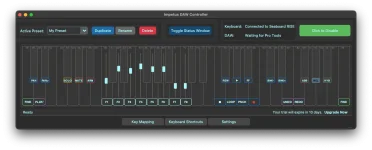
Impetus 1.0 communicates with supported DAWs through HUI or Mackie Control instead of relying only on ordinary MIDI Learn. This choice matters because a control-surface protocol carries more context than a loose collection of CC assignments, including track banking, transport commands, mute states, solo states, record arming, and mixer control.
Your MPE keyboard still supplies the physical gestures, but the DAW does not need to understand those gestures directly. Impetus translates them into a control language the host already knows, which is why the application can behave more like a dedicated surface than a keyboard with a handful of custom mappings.
The distinction becomes important as soon as the session changes. A manually mapped CC can remain glued to one parameter, while a control-surface fader can follow whichever track occupies its current bank position. Transport buttons, channel selection, mute, solo, record arm, and bank movement also belong to the surface relationship rather than a pile of unrelated mappings.
Impetus uses this layer to turn MPE movement into eight bankable faders while keeping the DAW side recognizable. Its Impetus control-surface protocol support therefore matters less as a compatibility badge than as the mechanism that lets one physical gesture keep working as you move through a larger mixer.
Two-way communication is another part of the model. A DAW surface is not merely shouting commands at the host because the host can also send state back through the assigned output connection. The same principle appears in adaptable DAW control-surface designs where faders and switches send control messages while the surface can receive MIDI information in return.
Input handles commands arriving from the controller side. Output gives the DAW a route back for surface state, which becomes important whenever the controller layer needs to stay synchronized with track selection, banking, parameter values, or other host changes. A surface configured with only half of that path can appear partly alive while still behaving strangely.
Port separation also prevents a subtler failure. Several controller manufacturers deliberately expose a normal musical MIDI port and a separate DAW-control port, then instruct users to keep the DAW port out of ordinary instrument input. Otherwise transport buttons or control-surface messages can leak into a record-enabled instrument track and produce unwanted notes or controller events.
Impetus changes the front end of this arrangement because your expressive keyboard supplies the gestures and the application performs the translation. The DAW side still benefits from the same discipline. Control-surface traffic belongs in the surface configuration, while musical performance data belongs on the path feeding instruments and MIDI tracks.
This is why protocol selection comes before fine-tuning the physical feel of an Impetus fader. Absolute, Relative, Hybrid, and Fine modes determine how your gesture is translated on the Impetus side, while HUI or Mackie Control determines how the DAW understands the resulting surface messages. Mixing those two layers together makes troubleshooting harder than it needs to be.
A clean setup therefore has two separate jobs. Impetus must correctly interpret the keyboard gesture, and the DAW must correctly recognize the translated control surface on the appropriate ports. Once both sides agree, banking, transport, channel functions, and fader movement can follow the session context without rebuilding a manual MIDI map for every project.
Your MPE keyboard still supplies the physical gestures, but the DAW does not need to understand those gestures directly. Impetus translates them into a control language the host already knows, which is why the application can behave more like a dedicated surface than a keyboard with a handful of custom mappings.
Control-surface protocols sit above ordinary MIDI mapping
A generic MIDI mapping usually starts with one message and one destination. Move a knob, teach the DAW which parameter should follow it, then repeat the process for the next control. HUI and Mackie Control work differently because the host recognizes an expected surface layout and assigns meaning to incoming messages within that layout.The distinction becomes important as soon as the session changes. A manually mapped CC can remain glued to one parameter, while a control-surface fader can follow whichever track occupies its current bank position. Transport buttons, channel selection, mute, solo, record arm, and bank movement also belong to the surface relationship rather than a pile of unrelated mappings.
Impetus uses this layer to turn MPE movement into eight bankable faders while keeping the DAW side recognizable. Its Impetus control-surface protocol support therefore matters less as a compatibility badge than as the mechanism that lets one physical gesture keep working as you move through a larger mixer.
Two-way communication is another part of the model. A DAW surface is not merely shouting commands at the host because the host can also send state back through the assigned output connection. The same principle appears in adaptable DAW control-surface designs where faders and switches send control messages while the surface can receive MIDI information in return.
HUI and Mackie Control need the right DAW-side ports
Supporting both protocols does not mean every DAW expects the same setup. Pro Tools commonly exposes HUI devices through its MIDI controller configuration, while Logic, Cubase, Live, Reaper, and other hosts commonly offer Mackie Control or MCU-style surface entries. The names vary, but the important step is assigning the control surface to the intended input and output ports. A wrong port can make the surface seem broken even while the keyboard itself still plays instruments normally.Input handles commands arriving from the controller side. Output gives the DAW a route back for surface state, which becomes important whenever the controller layer needs to stay synchronized with track selection, banking, parameter values, or other host changes. A surface configured with only half of that path can appear partly alive while still behaving strangely.
Port separation also prevents a subtler failure. Several controller manufacturers deliberately expose a normal musical MIDI port and a separate DAW-control port, then instruct users to keep the DAW port out of ordinary instrument input. Otherwise transport buttons or control-surface messages can leak into a record-enabled instrument track and produce unwanted notes or controller events.
Impetus changes the front end of this arrangement because your expressive keyboard supplies the gestures and the application performs the translation. The DAW side still benefits from the same discipline. Control-surface traffic belongs in the surface configuration, while musical performance data belongs on the path feeding instruments and MIDI tracks.
Protocol choice shapes behavior before any fader moves
HUI and Mackie Control overlap in purpose, but they are not interchangeable labels for raw MIDI. A host interprets each according to its own control-surface implementation, so choosing the wrong type can leave buttons inactive, faders misassigned, or banking behavior out of step even when MIDI activity is visibly reaching the computer.This is why protocol selection comes before fine-tuning the physical feel of an Impetus fader. Absolute, Relative, Hybrid, and Fine modes determine how your gesture is translated on the Impetus side, while HUI or Mackie Control determines how the DAW understands the resulting surface messages. Mixing those two layers together makes troubleshooting harder than it needs to be.
A clean setup therefore has two separate jobs. Impetus must correctly interpret the keyboard gesture, and the DAW must correctly recognize the translated control surface on the appropriate ports. Once both sides agree, banking, transport, channel functions, and fader movement can follow the session context without rebuilding a manual MIDI map for every project.