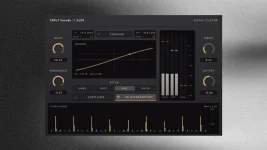
KLOP includes optional 4x oversampling around a clipper that can run Hard, Soft, Pro, or Ratio transfer curves. The switch matters because clipping is nonlinear and can create frequencies that were not present in the input.
Those new harmonics are useful up to a point. Once they extend beyond the Nyquist limit of the session, some can fold back into the audible range as aliasing instead of disappearing cleanly.
The KLOP visual clipper controls give you a simple 4x option rather than a ladder of 2x, 4x, 8x, and 16x settings. Treat it as a targeted quality switch, not something that automatically needs to stay on.
The point is not extra detail in the original recording. Oversampling is there because the clipping process itself creates fresh spectral content, especially when a transfer curve is pushed hard.
Hard clipping is a particularly demanding case because its abrupt waveform corners produce a long run of harmonics. KLOP's Hard, Soft, Pro, and Ratio modes do not generate identical spectra, so the usefulness of 4x can change when you change the curve.
Bright sources expose the problem sooner. High synth notes, cymbal-heavy material, sharp percussion, and clipped upper harmonics already sit closer to the session's frequency ceiling, leaving less room for new harmonics before foldback begins.
A thick low kick shaved by a tiny amount may show almost no useful audible difference when 4x is engaged. Push a bright lead into Hard mode, and the result can be much easier to judge.
The same logic applies to input level and Threshold. KLOP's Learn to Target and Threshold workflow can move more signal into the nonlinear region without changing the selected oversampling mode, so a setting that sounded fine earlier may behave differently after gain staging changes.
Start by getting the clipping action where you actually want it. Then toggle 4x at matched loudness on the loudest, brightest section and listen for rough side tones, brittle high-frequency grain, or a cleaner top end rather than assuming the higher setting wins.
The useful catch is that oversampling filter design matters. A 4x label tells you the rate multiplier, but it does not reveal the exact filter response, phase behavior, computational cost, or latency of the implementation.
KLOP's published feature details do not specify those filter characteristics. Avoid inventing a technical advantage from the multiplier alone, especially when two different clippers can both say 4x while using very different resampling filters.
Sparse bright sounds are useful stress tests because aliasing has fewer places to hide. A sustained high synth note or exposed percussion loop will usually reveal unwanted folded tones more clearly than a dense chorus packed with drums, guitars, vocals, and effects.
Do not panic because a spectrum display changes. Aliasing can be visible while remaining too quiet or too masked to matter in the track, and a technically cleaner graph is not automatically a better listening result.
CPU also matters in a real session. Processing at four times the project rate requires extra work, so leaving 4x off while building a large mix can be perfectly sensible when you cannot hear a benefit yet.
Check it again before the final render, especially after changing the clipping mode, lowering Threshold, or pushing Learn to Target harder. Those moves can increase harmonic generation and make oversampling more useful than it was during an earlier, gentler setup.
Keep 4x engaged when the matched comparison removes audible aliasing or cleans up exposed high-frequency distortion without hurting the result you wanted. Leave it off when the difference disappears inside the actual mix, because a quality switch earns its CPU only when it changes something worth keeping.
Those new harmonics are useful up to a point. Once they extend beyond the Nyquist limit of the session, some can fold back into the audible range as aliasing instead of disappearing cleanly.
The KLOP visual clipper controls give you a simple 4x option rather than a ladder of 2x, 4x, 8x, and 16x settings. Treat it as a targeted quality switch, not something that automatically needs to stay on.
Oversampling targets aliasing from nonlinear clipping
Oversampling temporarily gives the nonlinear stage a higher internal sample rate. A 48 kHz session processed at 4x has more frequency room inside that stage before newly created harmonics reach its temporary Nyquist limit.The point is not extra detail in the original recording. Oversampling is there because the clipping process itself creates fresh spectral content, especially when a transfer curve is pushed hard.
Hard clipping is a particularly demanding case because its abrupt waveform corners produce a long run of harmonics. KLOP's Hard, Soft, Pro, and Ratio modes do not generate identical spectra, so the usefulness of 4x can change when you change the curve.
Bright sources expose the problem sooner. High synth notes, cymbal-heavy material, sharp percussion, and clipped upper harmonics already sit closer to the session's frequency ceiling, leaving less room for new harmonics before foldback begins.
A thick low kick shaved by a tiny amount may show almost no useful audible difference when 4x is engaged. Push a bright lead into Hard mode, and the result can be much easier to judge.
Hard mode gives 4x more work to justify
KLOP's oversampling decision should come after the amount of clipping is set, not before. A barely active clipper has less nonlinear work to clean up than one chewing through a large part of every transient.The same logic applies to input level and Threshold. KLOP's Learn to Target and Threshold workflow can move more signal into the nonlinear region without changing the selected oversampling mode, so a setting that sounded fine earlier may behave differently after gain staging changes.
Start by getting the clipping action where you actually want it. Then toggle 4x at matched loudness on the loudest, brightest section and listen for rough side tones, brittle high-frequency grain, or a cleaner top end rather than assuming the higher setting wins.
The useful catch is that oversampling filter design matters. A 4x label tells you the rate multiplier, but it does not reveal the exact filter response, phase behavior, computational cost, or latency of the implementation.
KLOP's published feature details do not specify those filter characteristics. Avoid inventing a technical advantage from the multiplier alone, especially when two different clippers can both say 4x while using very different resampling filters.
The useful setting is the one you can hear
Run the comparison on real material first. Keep Threshold, mode, input level, output level, and monitoring volume fixed, because moving any of them while testing oversampling turns one clean comparison into several tangled ones.Sparse bright sounds are useful stress tests because aliasing has fewer places to hide. A sustained high synth note or exposed percussion loop will usually reveal unwanted folded tones more clearly than a dense chorus packed with drums, guitars, vocals, and effects.
Do not panic because a spectrum display changes. Aliasing can be visible while remaining too quiet or too masked to matter in the track, and a technically cleaner graph is not automatically a better listening result.
CPU also matters in a real session. Processing at four times the project rate requires extra work, so leaving 4x off while building a large mix can be perfectly sensible when you cannot hear a benefit yet.
Check it again before the final render, especially after changing the clipping mode, lowering Threshold, or pushing Learn to Target harder. Those moves can increase harmonic generation and make oversampling more useful than it was during an earlier, gentler setup.
Keep 4x engaged when the matched comparison removes audible aliasing or cleans up exposed high-frequency distortion without hurting the result you wanted. Leave it off when the difference disappears inside the actual mix, because a quality switch earns its CPU only when it changes something worth keeping.