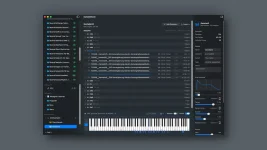
SampleStack 1.2 added multisample building, letting a folder of pitched recordings become a playable instrument with automatic root-note zones and velocity ranges. Drop in clean one-shots and the software can get surprisingly close on the first pass, but the first pass is not the instrument.
A multisample works because every recording has a home pitch and a zone around it. Play inside that zone, and the sampler retunes the recording rather than stretching one lonely file across the whole keyboard. More source notes mean less pitch shifting, which usually keeps attacks, formants, and texture closer to the original sound.
The useful part of the SampleStack sample library manager is not just automatic mapping. You can inspect the map, move root notes and zone boundaries, stack recordings at different velocities, set the amp envelope, audition the result polyphonically, and export only after the keyboard actually feels consistent.
Octave mistakes deserve special attention because they can look plausible. A detector may lock onto a stronger harmonic instead of the fundamental, or period matching can settle on a cycle twice as long or half as long as the intended one. The classic YIN fundamental-frequency estimator paper discusses the periodic ambiguities behind this family of errors.
SampleStack itself had to address a related real-world annoyance in version 1.3. Root-note detection was fixed for sample packs using different octave-numbering conventions, which matters because C3 does not mean exactly the same labeled octave in every ecosystem. A note name in a filename is useful evidence, not permission to skip listening.
Play every recorded root first, then test the keys halfway between neighboring roots. If a source note sounds right on its own but the boundary produces an ugly jump in tone, move the zone edge rather than retuning a perfectly good recording. The existing Goldmidi piece on octave errors in pitch detection goes deeper on why low and harmonically messy material can fool pitch analysis.
Play repeated notes while gradually increasing MIDI velocity. Listen for the exact point where the instrument suddenly changes character instead of merely getting stronger. Move the crossover until the change feels believable, and resist normalizing every source file separately because doing so can erase the natural level relationship you recorded.
Spacing across the keyboard needs the same kind of test. Sampling every note gives the least transposition but creates more files, while sparse sampling asks each recording to travel farther from its root. SampleStack’s own current guidance uses roughly three semitones between recorded notes as a practical middle ground for sampled synths, with denser capture making sense for exposed or realistic material.
Sustained sounds add one more trap. A root note can be correct, and the zone can feel smooth, yet a bad loop clicks or exposes obvious movement every few seconds. Hold chords long enough to hear the loop repeatedly, then check releases too. Fast single-note auditioning misses exactly the problems that show up once somebody actually plays the instrument.
Export format matters because not every destination carries the same instrument data. SampleStack currently preserves key zones, root notes, velocity layers, envelopes, loops, and stereo in formats such as SFZ, while some hardware-oriented exports drop selected features. A beautifully tuned source can therefore become a simpler instrument after conversion without anything being technically broken.
Keep the master multisample intact and treat exports as destination copies. The hardware sampler preparation workflow becomes useful here because sample rate, bit depth, channel count, filenames, and folder layout belong to the destination, not to the instrument you spent time mapping.
One final keyboard pass after export is worth doing in the actual player. Mapping data can survive while playback behavior still feels different, especially around envelopes, loops, fine-tuning, or unsupported layers. The job is finished when the exported instrument plays cleanly, not when the progress bar disappears.
A multisample works because every recording has a home pitch and a zone around it. Play inside that zone, and the sampler retunes the recording rather than stretching one lonely file across the whole keyboard. More source notes mean less pitch shifting, which usually keeps attacks, formants, and texture closer to the original sound.
The useful part of the SampleStack sample library manager is not just automatic mapping. You can inspect the map, move root notes and zone boundaries, stack recordings at different velocities, set the amp envelope, audition the result polyphonically, and export only after the keyboard actually feels consistent.
Pitch detection gets the map started, not finished
Clean sustained notes are easy material. Noisy plucks, bells, distorted basses, percussion with a strong resonance, and sounds whose pitch moves after the attack give a detector a much uglier job. A file can land near the right part of the keyboard while still being one semitone or one octave wrong.Octave mistakes deserve special attention because they can look plausible. A detector may lock onto a stronger harmonic instead of the fundamental, or period matching can settle on a cycle twice as long or half as long as the intended one. The classic YIN fundamental-frequency estimator paper discusses the periodic ambiguities behind this family of errors.
SampleStack itself had to address a related real-world annoyance in version 1.3. Root-note detection was fixed for sample packs using different octave-numbering conventions, which matters because C3 does not mean exactly the same labeled octave in every ecosystem. A note name in a filename is useful evidence, not permission to skip listening.
Play every recorded root first, then test the keys halfway between neighboring roots. If a source note sounds right on its own but the boundary produces an ugly jump in tone, move the zone edge rather than retuning a perfectly good recording. The existing Goldmidi piece on octave errors in pitch detection goes deeper on why low and harmonically messy material can fool pitch analysis.
Velocity layers expose rough transitions quickly
Multiple recordings of the same pitch can turn a flat map into something that actually reacts to your hands. SampleStack assigns samples sharing a pitch to velocity ranges automatically, but equal-looking ranges are not automatically musical. A soft recording and a hard recording can differ in brightness, attack, noise, or sustain far more than their peak levels suggest.Play repeated notes while gradually increasing MIDI velocity. Listen for the exact point where the instrument suddenly changes character instead of merely getting stronger. Move the crossover until the change feels believable, and resist normalizing every source file separately because doing so can erase the natural level relationship you recorded.
Spacing across the keyboard needs the same kind of test. Sampling every note gives the least transposition but creates more files, while sparse sampling asks each recording to travel farther from its root. SampleStack’s own current guidance uses roughly three semitones between recorded notes as a practical middle ground for sampled synths, with denser capture making sense for exposed or realistic material.
Sustained sounds add one more trap. A root note can be correct, and the zone can feel smooth, yet a bad loop clicks or exposes obvious movement every few seconds. Hold chords long enough to hear the loop repeatedly, then check releases too. Fast single-note auditioning misses exactly the problems that show up once somebody actually plays the instrument.
A full keyboard pass belongs before export
Run the finished map from bottom to top at several velocities before exporting anything. Listen for octave slips, abrupt zone changes, unexpected stereo shifts, clipped attacks, short releases, and one velocity layer that jumps out. Fixing those inside the source instrument is cleaner than repairing several exported versions later.Export format matters because not every destination carries the same instrument data. SampleStack currently preserves key zones, root notes, velocity layers, envelopes, loops, and stereo in formats such as SFZ, while some hardware-oriented exports drop selected features. A beautifully tuned source can therefore become a simpler instrument after conversion without anything being technically broken.
Keep the master multisample intact and treat exports as destination copies. The hardware sampler preparation workflow becomes useful here because sample rate, bit depth, channel count, filenames, and folder layout belong to the destination, not to the instrument you spent time mapping.
One final keyboard pass after export is worth doing in the actual player. Mapping data can survive while playback behavior still feels different, especially around envelopes, loops, fine-tuning, or unsupported layers. The job is finished when the exported instrument plays cleanly, not when the progress bar disappears.