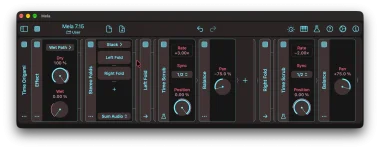
Mela 7.15’s Time Scrub keeps playback at 1× whenever Position stays still, no matter where that read point sits in the buffer. Move Position over time and the rate changes. The direction and speed of that movement decide whether the audio speeds up, slows down, freezes, or runs backward.
The Mela 7.15 Time Scrub module uses a tempo-synced buffer whose length comes from Sync. Position then chooses where Mela reads inside that buffer, from the fully delayed end at −100% to the live input at 0%. Sync can run from 1/64 through four bars, including dotted and triplet values.
Here’s the bit worth separating in your head. Position is not a normal speed knob, because a fixed Position still plays at normal speed. Playback rate changes only while the read point is moving.
Start ramping Position toward 0%, and the read point moves toward the live input while new audio keeps entering the buffer. It is catching up, so playback gets faster. Ramp the other way and the read point falls backward through the buffered material, which can make playback slower, stationary, or reversed depending on how quickly the move happens.
A 2026 DAFx paper on time-varying delay line behavior describes the same underlying idea, where changing delay over time alters instantaneous frequency and phase. Time Scrub packages that behavior into musically useful tempo values instead of making you calculate delay motion in samples. The Rate display is the practical sanity check when the modulation becomes less obvious.
Set Sync to 1/4 and move Position from −100% to 0% over one quarter note. The ratio is 1, so the result is 2× playback. Make the same upward trip in an eighth note and the ratio becomes 2, which gives 3× playback.
The downward side is where the useful weirdness starts. With Sync at 1/4, a quarter-note ramp from 0% down to −100% gives 0× because 1 − 1 equals zero. Stretch the downward ramp to a half note and the ratio drops to one half, giving 0.5× playback instead of a full stop.
Speed the same downward move up to an eighth note and the rate becomes −1×. Negative playback means the read point is moving backward through the buffer faster than incoming audio advances it, so you hear reverse playback. A value of −1× is the clean reference case because the reversed material moves at normal speed.
The useful shortcut is the ratio, not the absolute note value. A full-range sweep with Sync at 1/8 and a ramp lasting 1/8 produces the same rate relationship as 1/4 against 1/4. Change the tempo and the musical durations change in seconds, but equal synced values still preserve the same rate calculation.
Stepped modulation is different again. Each step can jump the read point backward to older material, creating a repeat, but the Position is stationary between those jumps. Since a stationary Position plays at 1×, the repeated slice runs forward normally until the next step moves the read point somewhere else.
This distinction keeps beat repeats from getting lumped together with continuous speed changes. A ramp changes rate while it travels, while a step relocates playback and then lets it continue normally. You can use the same Time Scrub buffer for both behaviors without treating every Position change as pitch-bent playback.
The Rate display also makes awkward ratios usable. Sync at 1/4 with a downward ramp lasting three eighth notes lands between normal speed and a freeze, rather than on one of the neat textbook values. You do not need to force every modulation into 2×, 1×, 0×, or −1× when the in-between rates are often the more interesting part.
The Mela 7.15 Time Scrub module uses a tempo-synced buffer whose length comes from Sync. Position then chooses where Mela reads inside that buffer, from the fully delayed end at −100% to the live input at 0%. Sync can run from 1/64 through four bars, including dotted and triplet values.
Here’s the bit worth separating in your head. Position is not a normal speed knob, because a fixed Position still plays at normal speed. Playback rate changes only while the read point is moving.
Position controls the buffer read point
A steady Position simply changes how far behind the live input you are listening. Park it at −100%, and you hear audio delayed by the full Sync duration. Park it somewhere closer to 0%, and the delay becomes shorter, but the material still moves forward at 1×.Start ramping Position toward 0%, and the read point moves toward the live input while new audio keeps entering the buffer. It is catching up, so playback gets faster. Ramp the other way and the read point falls backward through the buffered material, which can make playback slower, stationary, or reversed depending on how quickly the move happens.
A 2026 DAFx paper on time-varying delay line behavior describes the same underlying idea, where changing delay over time alters instantaneous frequency and phase. Time Scrub packages that behavior into musically useful tempo values instead of making you calculate delay motion in samples. The Rate display is the practical sanity check when the modulation becomes less obvious.
Sync and ramp time set the actual rate
For a linear sweep across the full Position range, Mela gives you a simple relationship. An upward ramp uses 1 + Sync duration ÷ ramp duration. A downward ramp uses 1 − Sync duration ÷ ramp duration.Set Sync to 1/4 and move Position from −100% to 0% over one quarter note. The ratio is 1, so the result is 2× playback. Make the same upward trip in an eighth note and the ratio becomes 2, which gives 3× playback.
The downward side is where the useful weirdness starts. With Sync at 1/4, a quarter-note ramp from 0% down to −100% gives 0× because 1 − 1 equals zero. Stretch the downward ramp to a half note and the ratio drops to one half, giving 0.5× playback instead of a full stop.
Speed the same downward move up to an eighth note and the rate becomes −1×. Negative playback means the read point is moving backward through the buffer faster than incoming audio advances it, so you hear reverse playback. A value of −1× is the clean reference case because the reversed material moves at normal speed.
The useful shortcut is the ratio, not the absolute note value. A full-range sweep with Sync at 1/8 and a ramp lasting 1/8 produces the same rate relationship as 1/4 against 1/4. Change the tempo and the musical durations change in seconds, but equal synced values still preserve the same rate calculation.
Partial moves and steps behave differently
The published equations apply to linear ramps across the entire Position range. If your modulation only moves through part of the range, the full-range examples stop being a reliable mental calculator. Watch Mela’s Rate readout instead of assuming a quarter-note modulation always means 2×, 0×, or −1×.Stepped modulation is different again. Each step can jump the read point backward to older material, creating a repeat, but the Position is stationary between those jumps. Since a stationary Position plays at 1×, the repeated slice runs forward normally until the next step moves the read point somewhere else.
This distinction keeps beat repeats from getting lumped together with continuous speed changes. A ramp changes rate while it travels, while a step relocates playback and then lets it continue normally. You can use the same Time Scrub buffer for both behaviors without treating every Position change as pitch-bent playback.
The Rate display also makes awkward ratios usable. Sync at 1/4 with a downward ramp lasting three eighth notes lands between normal speed and a freeze, rather than on one of the neat textbook values. You do not need to force every modulation into 2×, 1×, 0×, or −1× when the in-between rates are often the more interesting part.