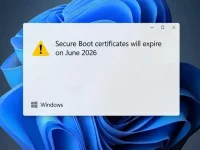
A silent Windows update is about to turn into a boot failure for unprepared systems. Microsoft is replacing expiring security certificates that underpin the Secure Boot function on countless devices. Without these new certificates, systems may stop trusting updated software components, leading to potential startup failures and security risks. This transition affects both Windows 10 and Windows 11 installations across physical and virtual machines.
The core issue involves aging trust anchors from over a decade ago. These certificates verify the legitimacy of boot software during startup. As they reach their validity end, machines need newer certificates installed to maintain a continuous chain of trust. Failure to update will cause systems to reject newly signed drivers and operating system files.
Windows 11 devices should receive the necessary updates automatically through standard system updates, provided they remain actively serviced. The situation is more complex for Windows 10 machines, especially those beyond their standard support period. Systems not enrolled in extended security programs might not get the new certificates without manual intervention.
The main risk involves systems running without current updates beyond the certificate expiration. Those machines could encounter compatibility problems with future software and face weakened security postures. The practical advice is to ensure all supported devices receive regular updates. For any Windows 10 systems intended for continued use, verifying their update path is essential. This preparation helps avoid disrupted functionality when the old certificates become invalid.
The core issue involves aging trust anchors from over a decade ago. These certificates verify the legitimacy of boot software during startup. As they reach their validity end, machines need newer certificates installed to maintain a continuous chain of trust. Failure to update will cause systems to reject newly signed drivers and operating system files.
Windows 11 devices should receive the necessary updates automatically through standard system updates, provided they remain actively serviced. The situation is more complex for Windows 10 machines, especially those beyond their standard support period. Systems not enrolled in extended security programs might not get the new certificates without manual intervention.
The main risk involves systems running without current updates beyond the certificate expiration. Those machines could encounter compatibility problems with future software and face weakened security postures. The practical advice is to ensure all supported devices receive regular updates. For any Windows 10 systems intended for continued use, verifying their update path is essential. This preparation helps avoid disrupted functionality when the old certificates become invalid.