MIDI Program Change can recall a different preset on a guitar processor without anyone touching the floorboard. In a synced heavy set, that means the verse, chorus, breakdown, and ambient section can each arrive on cue while the guitarist keeps both feet planted.
The useful bit is not MIDI for its own sake. It is moving routine switching into the song timeline, where a DAW or playback rig can send the same command at the same musical point every night. Manual foot control still has a place, but it stops carrying every transition.
A good setup also separates preset changes from parameter movement. Those are different jobs, and trying to solve both with one message type is where otherwise simple rigs get annoying.
Banks complicate things slightly once a device holds more presets than one Program Change range can address. Some processors use Bank Select messages before Program Change, and the order matters. Current Line 6 documentation, for example, specifies sending the bank message first and the preset message after it.
This is worth testing instead of assuming every box behaves the same. A processor may number presets from one while MIDI data starts from zero, or it may split presets across banks in a way that looks obvious on the screen but is not obvious in the MIDI map. One wrong offset can make a breakdown load the clean patch, which is funny exactly once.
For rigs that offer scenes or snapshots inside one preset, switching those can be cleaner than loading an entirely different preset for every section. The exact behavior depends on the processor, but the basic idea is useful. Keep the amp, cabinet, and core routing loaded, then switch smaller states inside that setup when the device supports it.
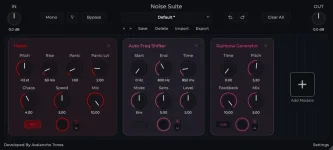
This distinction matters with Noise Suite MIDI mapping and DAW automation because switching an effect on is a different problem from moving its feedback, pitch, wet level, or another mapped control. Treating every action as a preset recall makes the rig clumsy fast.
For a heavy arrangement, the useful move might be tiny. A glitch effect can enter for one beat, a delay feedback control can rise across the last half of a bar, or a pitch parameter can jump only on the final hit before a breakdown. None of those jobs needs a whole new preset if the device or plug-in exposes the parameter directly.
Timing deserves attention once the rig starts reacting automatically. Musical performance is sensitive to latency, and latency tolerance measurements in musical performance found that tolerance varies with instrument and tempo. The practical lesson is simple enough. Test the exact rig under real playback conditions instead of assuming a command landing on the grid will feel identical after every hardware and software stage has responded.
Keep manual access to the important states. A foot controller can act as backup even when the DAW normally sends the commands, and a few clearly named presets are easier to recover than a maze of nearly identical patches. Recovery matters more than cleverness when a song is already moving.
Run the entire set with the real interface, processor, cables, playback machine, and tempo map. Check preset loads at section boundaries, confirm continuous controls return to sane values, and watch for commands that arrive correctly but leave the receiving device in an unexpected state.
Do not stop at the obvious verse-to-chorus changes. Test count-ins, song restarts, skipped sections, paused playback, and manual overrides too. Automation removes pedal dancing, but only after the boring failure cases have been rehearsed as carefully as the riffs themselves.
The useful bit is not MIDI for its own sake. It is moving routine switching into the song timeline, where a DAW or playback rig can send the same command at the same musical point every night. Manual foot control still has a place, but it stops carrying every transition.
A good setup also separates preset changes from parameter movement. Those are different jobs, and trying to solve both with one message type is where otherwise simple rigs get annoying.
Program Change handles the big scene changes
Program Change is built for recalling a stored program or preset. If your processor has one sound for the verse and another for the chorus, the DAW can send the appropriate program number when the arrangement reaches each section. Ableton Live, for example, can send Program Change data from MIDI clips to external hardware or compatible plug-ins.Banks complicate things slightly once a device holds more presets than one Program Change range can address. Some processors use Bank Select messages before Program Change, and the order matters. Current Line 6 documentation, for example, specifies sending the bank message first and the preset message after it.
This is worth testing instead of assuming every box behaves the same. A processor may number presets from one while MIDI data starts from zero, or it may split presets across banks in a way that looks obvious on the screen but is not obvious in the MIDI map. One wrong offset can make a breakdown load the clean patch, which is funny exactly once.
For rigs that offer scenes or snapshots inside one preset, switching those can be cleaner than loading an entirely different preset for every section. The exact behavior depends on the processor, but the basic idea is useful. Keep the amp, cabinet, and core routing loaded, then switch smaller states inside that setup when the device supports it.
Continuous control belongs to CC and automation
Program Change is not meant to draw a smooth feedback rise or sweep a pitch effect over half a bar. MIDI Control Change messages and DAW parameter automation are the better tools for values that need to move while audio keeps running. A foot pedal can send changing CC values, while a DAW can draw the same movement directly onto the timeline.This distinction matters with Noise Suite MIDI mapping and DAW automation because switching an effect on is a different problem from moving its feedback, pitch, wet level, or another mapped control. Treating every action as a preset recall makes the rig clumsy fast.
For a heavy arrangement, the useful move might be tiny. A glitch effect can enter for one beat, a delay feedback control can rise across the last half of a bar, or a pitch parameter can jump only on the final hit before a breakdown. None of those jobs needs a whole new preset if the device or plug-in exposes the parameter directly.
Timing deserves attention once the rig starts reacting automatically. Musical performance is sensitive to latency, and latency tolerance measurements in musical performance found that tolerance varies with instrument and tempo. The practical lesson is simple enough. Test the exact rig under real playback conditions instead of assuming a command landing on the grid will feel identical after every hardware and software stage has responded.
Automation still needs a manual escape hatch
A fully automated rig can be wonderfully boring when it works. The danger is building a show where one missed cue, stopped playback session, wrong MIDI channel, or disconnected cable leaves the guitarist unable to reach the sound needed for the next section.Keep manual access to the important states. A foot controller can act as backup even when the DAW normally sends the commands, and a few clearly named presets are easier to recover than a maze of nearly identical patches. Recovery matters more than cleverness when a song is already moving.
Run the entire set with the real interface, processor, cables, playback machine, and tempo map. Check preset loads at section boundaries, confirm continuous controls return to sane values, and watch for commands that arrive correctly but leave the receiving device in an unexpected state.
Do not stop at the obvious verse-to-chorus changes. Test count-ins, song restarts, skipped sections, paused playback, and manual overrides too. Automation removes pedal dancing, but only after the boring failure cases have been rehearsed as carefully as the riffs themselves.