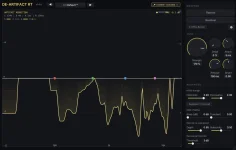
Intrect’s de-artifact can solo the signal it subtracts, so you can hear the exact material disappearing before committing the cleanup. The trick is not getting impressed by how nasty the residual sounds. Nasty is often the point.
A useful residual should mostly contain the stuff you wanted gone, such as fizz, watery high-end smear, ringing, or codec hash. Once recognizable vocal body, drum attack, bass fundamentals, or clear musical phrases start living there, the processor has crossed from cleanup into removal.
This is where de-artifact’s residual monitoring workflow earns its keep. You are not hunting for the quietest residual possible. You are listening for the moment useful music begins joining the junk.
Vocals give you the easiest warning signs. Breath noise can survive in the residual without automatically being a disaster, but the shape of a vowel, a clear consonant, or the singer’s actual pitch is different. Back Strength down when you can follow the performance through the removed signal.
Drums need another kind of listening. A little brittle cymbal wash may be exactly what you want de-artifact to catch, while the snap of the snare or the front edge of a kick is musical structure. If those attacks become obvious in Residual, use less global reduction or more transient protection instead of polishing the hit away.
Full mixes are messier because everything masks everything else. Listen for recognizable melodies, bass movement, vocal words, and rhythmic attacks rather than trying to decide whether the residual sounds “musical” in some vague sense. Specific content is the red flag.
The same distinction matters on compressed files. Codec grit often clusters near the upper edge of useful bandwidth, so a residual full of thin high-frequency trash can be healthy. A bright guitar pick, hi-hat pattern, or vocal sibilant arriving intact is not just trash because it happens to live up high.
The blue trace is more useful when paired with your ears. Heavy activity in the top octaves can make sense on AI or codec-damaged material, while deep low-frequency removal deserves a closer listen because bass fundamentals and vocal body are easier to injure there.
A nearly flat reduction curve is not a challenge to make the plug-in work harder. Clean bass stems may give the model very little worth removing, and forcing Strength upward just to create visible movement can turn a healthy file into a damaged one.
The wider lesson matches perceptual audio quality across artifact types, where quality judgments depend on the kind of distortion being evaluated. One reduction number cannot tell you whether a removed snare attack matters more than a larger amount of harmless fizz.
Brightness also sits outside the main reduction curve. The display is showing subtraction rather than every tonal change you hear at the output, so a brighter or darker result cannot always be diagnosed by staring at the yellow line. Use the monitor for removal, then judge tone normally.
Sample alignment still does not make the comparison automatically loudness-matched. On a master, keep the perceived level close before deciding the cleaned version is better, especially when other processors later in the chain react differently to its output.
Residual playback has another quirk worth knowing. Intrect notes that its residual phase can change with chunk-grid alignment between plays even when the spectrum and RMS remain stable. A slightly different fine-grained sound on another transport pass therefore does not automatically mean the model changed its decision.
Use the same sample rate and transport start when you need a repeatable technical comparison. For ordinary cleanup, focus on what survives conceptually across plays, such as words, attacks, pitches, and frequency regions, instead of chasing tiny phase differences.
Finish the check in the full mix. A residual can sound dramatic in solo while the cleaned track improves in context, and the reverse can happen when a seemingly tiny removed consonant suddenly makes a vocal feel soft or detached beside the instruments.
A useful residual should mostly contain the stuff you wanted gone, such as fizz, watery high-end smear, ringing, or codec hash. Once recognizable vocal body, drum attack, bass fundamentals, or clear musical phrases start living there, the processor has crossed from cleanup into removal.
This is where de-artifact’s residual monitoring workflow earns its keep. You are not hunting for the quietest residual possible. You are listening for the moment useful music begins joining the junk.
Clean residuals sound ugly for the right reasons
Start on a short section where the defect is obvious, then switch Residual on and leave the normal mix alone for a few seconds. Hash and grain can sound surprisingly loud in isolation because the musical signal masking them has vanished. Do not mistake an unpleasant solo for excessive processing by itself.Vocals give you the easiest warning signs. Breath noise can survive in the residual without automatically being a disaster, but the shape of a vowel, a clear consonant, or the singer’s actual pitch is different. Back Strength down when you can follow the performance through the removed signal.
Drums need another kind of listening. A little brittle cymbal wash may be exactly what you want de-artifact to catch, while the snap of the snare or the front edge of a kick is musical structure. If those attacks become obvious in Residual, use less global reduction or more transient protection instead of polishing the hit away.
Full mixes are messier because everything masks everything else. Listen for recognizable melodies, bass movement, vocal words, and rhythmic attacks rather than trying to decide whether the residual sounds “musical” in some vague sense. Specific content is the red flag.
The same distinction matters on compressed files. Codec grit often clusters near the upper edge of useful bandwidth, so a residual full of thin high-frequency trash can be healthy. A bright guitar pick, hi-hat pattern, or vocal sibilant arriving intact is not just trash because it happens to live up high.
The display tells you the amount and target separately
De-artifact’s yellow curve shows how much reduction is happening by frequency, while the blue residual curve shows the frequency shape of what got removed. Those are different jobs. A deep yellow dip tells you the processor is working hard, not whether it made a good decision.The blue trace is more useful when paired with your ears. Heavy activity in the top octaves can make sense on AI or codec-damaged material, while deep low-frequency removal deserves a closer listen because bass fundamentals and vocal body are easier to injure there.
A nearly flat reduction curve is not a challenge to make the plug-in work harder. Clean bass stems may give the model very little worth removing, and forcing Strength upward just to create visible movement can turn a healthy file into a damaged one.
The wider lesson matches perceptual audio quality across artifact types, where quality judgments depend on the kind of distortion being evaluated. One reduction number cannot tell you whether a removed snare attack matters more than a larger amount of harmless fizz.
Brightness also sits outside the main reduction curve. The display is showing subtraction rather than every tonal change you hear at the output, so a brighter or darker result cannot always be diagnosed by staring at the yellow line. Use the monitor for removal, then judge tone normally.
Matched bypass keeps timing out of the argument
De-artifact keeps its reported latency when you use the built-in Bypass, so the dry and processed paths stay sample-aligned during the comparison. Disabling the plug-in itself is not the same test. A timing jump can make a subtle tonal change feel much bigger than it really is.Sample alignment still does not make the comparison automatically loudness-matched. On a master, keep the perceived level close before deciding the cleaned version is better, especially when other processors later in the chain react differently to its output.
Residual playback has another quirk worth knowing. Intrect notes that its residual phase can change with chunk-grid alignment between plays even when the spectrum and RMS remain stable. A slightly different fine-grained sound on another transport pass therefore does not automatically mean the model changed its decision.
Use the same sample rate and transport start when you need a repeatable technical comparison. For ordinary cleanup, focus on what survives conceptually across plays, such as words, attacks, pitches, and frequency regions, instead of chasing tiny phase differences.
Finish the check in the full mix. A residual can sound dramatic in solo while the cleaned track improves in context, and the reverse can happen when a seemingly tiny removed consonant suddenly makes a vocal feel soft or detached beside the instruments.