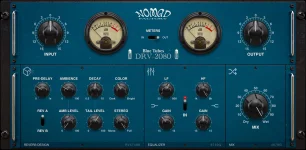
Nomad Factory assigns BlueVerb DRV-2080 Rev A to lower CPU use and Rev B to higher-quality reverb processing. The older manual is even more explicit, describing Rev A as the lighter good-quality mode and Rev B as the heavier high-quality mode. No percentage is attached to either setting in the current v4 material.
The BlueVerb DRV-2080 processing modes look simple because the switch only offers A or B, but its job is unusually narrow. It changes the quality and processor demand of the reverberation rather than replacing controls such as decay, ambience, stereo width, Color, EQ, or wet and dry mix. You are choosing how much computation the reverb gets, not choosing a different room preset.
The missing number matters because an old review once reported roughly 6 percent CPU for BlueVerb on a 2 GHz single-core computer running Pro Tools LE. A figure from that hardware generation says almost nothing useful about v4 on a current multicore Mac or Windows machine. Sample rate, buffer size, processor generation, and the rest of the session all change the headroom you actually have.
Rev A therefore makes more sense as a workload choice than as a supposedly inferior sound. During arranging, tracking, multi-instance setups, or high sample rates, the lighter mode can leave more processing room for instruments and other effects. A stable session is more useful than a quality switch set higher while the host is crackling.
A 96 kHz session handles twice as many samples per second as a 48 kHz session. Nomad Factory does not publish a formula showing how BlueVerb's CPU use scales with sample rate. The sensible test is the DAW's own performance meter under the session conditions you actually use.
More computation does not guarantee a dramatic sonic improvement. Research comparing reverb algorithms and computational cost found meaningful differences in processing overhead. The most expensive approaches did not win every perceptual comparison, so the general evidence does not support treating CPU cost as a direct measure of audible preference.
Rev B is consequently something to audition in context rather than trust by label. Try it on an exposed vocal tail, sparse synth passage, or snare ambience, then compare at matched levels. If the difference disappears once the arrangement returns, there is little practical reason to spend extra processor headroom on every instance during the entire writing session.
Freezing or bouncing processor-heavy instruments can create enough room to audition Rev B without changing the reverb design itself. Raising the audio buffer can also help during mixing when low monitoring latency is no longer essential. Neither move proves Rev B will sound better, but both let you compare the modes without a strained CPU deciding the result through clicks or dropouts.
One trap is changing Rev A to Rev B while also adjusting decay, tone, width, or wet level. Once several parameters move together, you are no longer comparing the quality modes cleanly. Keep the reverb settings fixed, match the listening level, switch only the processing mode, and judge the section where the tail is most exposed.
For a final render, Rev B is the documented higher-quality option. Nomad Factory makes no claim that every mix must use it, and no current CPU percentage tells you what it will cost on your machine. If Rev A already gives the texture you want, its lower processing demand remains a deliberate setting rather than a compromise you need to hide.
The BlueVerb DRV-2080 processing modes look simple because the switch only offers A or B, but its job is unusually narrow. It changes the quality and processor demand of the reverberation rather than replacing controls such as decay, ambience, stereo width, Color, EQ, or wet and dry mix. You are choosing how much computation the reverb gets, not choosing a different room preset.
Rev A keeps more CPU headroom available
Rev A is the practical starting point when a session is already busy. Legacy documentation calls Rev A the lower-CPU choice, while Nomad Factory's current v4 page still frames the modes as lower CPU versus higher-quality processing. Neither source publishes a modern benchmark for the size of the difference.The missing number matters because an old review once reported roughly 6 percent CPU for BlueVerb on a 2 GHz single-core computer running Pro Tools LE. A figure from that hardware generation says almost nothing useful about v4 on a current multicore Mac or Windows machine. Sample rate, buffer size, processor generation, and the rest of the session all change the headroom you actually have.
Rev A therefore makes more sense as a workload choice than as a supposedly inferior sound. During arranging, tracking, multi-instance setups, or high sample rates, the lighter mode can leave more processing room for instruments and other effects. A stable session is more useful than a quality switch set higher while the host is crackling.
A 96 kHz session handles twice as many samples per second as a 48 kHz session. Nomad Factory does not publish a formula showing how BlueVerb's CPU use scales with sample rate. The sensible test is the DAW's own performance meter under the session conditions you actually use.
Rev B spends more processing on the reverb
Rev B is the higher-quality setting according to the original manual, and the current product description preserves the same CPU-versus-quality idea. Nomad Factory does not explain which operations get more expensive, so claims about extra delay lines, oversampling, modulation density, or interpolation are guesswork. The published distinction stops at more CPU and higher-quality reverb processing.More computation does not guarantee a dramatic sonic improvement. Research comparing reverb algorithms and computational cost found meaningful differences in processing overhead. The most expensive approaches did not win every perceptual comparison, so the general evidence does not support treating CPU cost as a direct measure of audible preference.
Rev B is consequently something to audition in context rather than trust by label. Try it on an exposed vocal tail, sparse synth passage, or snare ambience, then compare at matched levels. If the difference disappears once the arrangement returns, there is little practical reason to spend extra processor headroom on every instance during the entire writing session.
The best mode can change during one project
You do not need to treat Rev A or Rev B as a permanent identity for the plug-in. A crowded production can stay on Rev A while you edit and arrange. Selected instances can move to Rev B once the project is stable enough to judge the final reverb texture, especially when several BlueVerb returns are running.Freezing or bouncing processor-heavy instruments can create enough room to audition Rev B without changing the reverb design itself. Raising the audio buffer can also help during mixing when low monitoring latency is no longer essential. Neither move proves Rev B will sound better, but both let you compare the modes without a strained CPU deciding the result through clicks or dropouts.
One trap is changing Rev A to Rev B while also adjusting decay, tone, width, or wet level. Once several parameters move together, you are no longer comparing the quality modes cleanly. Keep the reverb settings fixed, match the listening level, switch only the processing mode, and judge the section where the tail is most exposed.
For a final render, Rev B is the documented higher-quality option. Nomad Factory makes no claim that every mix must use it, and no current CPU percentage tells you what it will cost on your machine. If Rev A already gives the texture you want, its lower processing demand remains a deliberate setting rather than a compromise you need to hide.