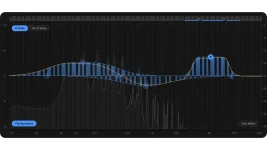
Scaler EQ Pro adds dedicated Bass and High-Frequency Compressors while keeping dynamic EQ available on every band with threshold, ratio, attack, and release controls. They overlap enough to look interchangeable at first, but they solve different sizes of problems.
The Scaler EQ Pro dynamics system gives you a broad low-end or high-end compressor alongside bands that can react dynamically at selected frequencies. The useful choice comes down to whether you need to control a region or one specific part inside it.
Think about a bass bus where the sub and upper bass rise together every time the player digs in. A narrow dynamic bell may catch one hot area, but the rest of the low end can still jump around it. Broad compression is cleaner when several nearby frequencies are participating in the same level change.
The High-Frequency Compressor takes the same regional approach at the other end. It is there to smooth overly energetic highs while keeping detail and openness, so it fits material where cymbals, bright synth layers, vocals, or a whole mix become edgy across a wider treble area rather than at one isolated peak.
Frequency-selective compression has been around far longer than this plugin. A multichannel dynamic-range compression model can divide compression across frequency channels, which is the useful principle here. The moment the complaint covers a chunk of the spectrum, a regional compressor starts making more sense than stacking tiny corrections.
This is the surgical option. A vocal might be fine until one presence region gets sharp on louder phrases, or a bass might only throw too much energy around one resonance on certain notes. Dynamic EQ lets the rest of the spectrum sit still while the problem area moves.
Sidechaining makes the difference even clearer. A kick can trigger one low-frequency band on a bass without forcing unrelated mids and harmonics to duck with every hit. If the collision only happens in a narrow area, reducing the whole low end wastes more of the bass than the masking problem demanded.
Goldmidi's dynamic EQ explainer gets to the core of it. The detector changes gain around the chosen EQ area when the threshold condition is met. You are not compressing everything below or above a broad boundary just because one smaller zone misbehaved.
Harmonic Peak bands make the choice more interesting because their frequency pattern follows the selected musical scale. The Harmonic Peak filter breakdown explains how one musical band can affect several note-related frequency points, and those bands can also run dynamically. A tonal problem tied to the musical filter shape therefore belongs there, not automatically in the Bass or High-Frequency Compressor.
A single ringing bass note, poky vocal band, harsh guitar area, or scale-related Harmonic Peak move points the other way. Put one dynamic band where the trouble actually lives and let threshold control when it moves. More processing around it usually means more chances to change parts of the sound that were already fine.
Stacking both can still make sense. The dedicated compressor can steady the overall region first, then a dynamic band can catch the one frequency that still jumps out afterward. Keep the jobs separate, and the settings usually stay simpler.
Continuous Gain Match is useful while making those calls because compression and EQ movement can change apparent loudness enough to fool quick comparisons. Match the level, bypass the processor, and listen for whether the actual problem became more stable. If the fix needs three extra bands to repair what the first processor changed, the first choice was probably too broad.
The Scaler EQ Pro dynamics system gives you a broad low-end or high-end compressor alongside bands that can react dynamically at selected frequencies. The useful choice comes down to whether you need to control a region or one specific part inside it.
The dedicated compressors handle broad spectral behavior
The Bass Compressor is meant for low-frequency energy as a whole rather than one narrow resonance. It is designed to tighten bass, control low-end movement, and preserve punch, which makes sense when the problem follows the whole bottom end instead of one fixed note or frequency.Think about a bass bus where the sub and upper bass rise together every time the player digs in. A narrow dynamic bell may catch one hot area, but the rest of the low end can still jump around it. Broad compression is cleaner when several nearby frequencies are participating in the same level change.
The High-Frequency Compressor takes the same regional approach at the other end. It is there to smooth overly energetic highs while keeping detail and openness, so it fits material where cymbals, bright synth layers, vocals, or a whole mix become edgy across a wider treble area rather than at one isolated peak.
Frequency-selective compression has been around far longer than this plugin. A multichannel dynamic-range compression model can divide compression across frequency channels, which is the useful principle here. The moment the complaint covers a chunk of the spectrum, a regional compressor starts making more sense than stacking tiny corrections.
Dynamic EQ is better when the problem has an address
Scaler EQ Pro can turn any ordinary or Harmonic Peak band into dynamic EQ. Threshold decides when the band reacts, while ratio, attack, and release shape how strongly and how quickly it moves. External sidechain input can also drive an individual band.This is the surgical option. A vocal might be fine until one presence region gets sharp on louder phrases, or a bass might only throw too much energy around one resonance on certain notes. Dynamic EQ lets the rest of the spectrum sit still while the problem area moves.
Sidechaining makes the difference even clearer. A kick can trigger one low-frequency band on a bass without forcing unrelated mids and harmonics to duck with every hit. If the collision only happens in a narrow area, reducing the whole low end wastes more of the bass than the masking problem demanded.
Goldmidi's dynamic EQ explainer gets to the core of it. The detector changes gain around the chosen EQ area when the threshold condition is met. You are not compressing everything below or above a broad boundary just because one smaller zone misbehaved.
Harmonic Peak bands make the choice more interesting because their frequency pattern follows the selected musical scale. The Harmonic Peak filter breakdown explains how one musical band can affect several note-related frequency points, and those bands can also run dynamically. A tonal problem tied to the musical filter shape therefore belongs there, not automatically in the Bass or High-Frequency Compressor.
Start with the size of the problem, not the fanciest processor
Low-end inconsistency across an entire bass instrument, drum bus, or mix is a Bass Compressor job before it is a five-band dynamic EQ puzzle. Broad high-frequency aggression follows the same logic. Start wide when the problem is wide.A single ringing bass note, poky vocal band, harsh guitar area, or scale-related Harmonic Peak move points the other way. Put one dynamic band where the trouble actually lives and let threshold control when it moves. More processing around it usually means more chances to change parts of the sound that were already fine.
Stacking both can still make sense. The dedicated compressor can steady the overall region first, then a dynamic band can catch the one frequency that still jumps out afterward. Keep the jobs separate, and the settings usually stay simpler.
Continuous Gain Match is useful while making those calls because compression and EQ movement can change apparent loudness enough to fool quick comparisons. Match the level, bypass the processor, and listen for whether the actual problem became more stable. If the fix needs three extra bands to repair what the first processor changed, the first choice was probably too broad.