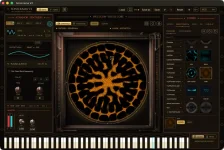
Sonicrama V2 exports square MP4 video at up to 4096 by 4096 pixels, at 30 or 60 fps, with audio embedded. PNG stills can be exported at the same maximum dimensions, so the visual side is not limited to whatever resolution you happen to see while playing.
The Sonicrama V2 visual export workflow separates performance capture from the expensive final render. You can record the take without forcing the finished high-resolution video to be calculated in real time, then let the render continue afterward on its own background thread.
Recorded takes are also reproducible at the particle level. Render the same captured performance again, and Sonicrama is designed to produce the same result down to individual grains instead of giving you a slightly different cymatics pass each time.
The split makes sense when a patch is already asking the GPU to solve plate modes and move a large particle field. Final output does not have to race the performance for every pixel at full export resolution. You can concentrate on the sound and movement during the take, then let the machine spend longer producing the finished frames.
A slower render does not automatically spoil the recorded performance either. Because final output is produced afterward, the finished file is not locked to the speed at which your machine can calculate a huge frame during live playback. Rendering may take longer, but you do not need to replay the musical take by hand simply to get another high-resolution pass.
Repeatability matters once you find a take worth keeping. A chord may produce exactly the plate movement you wanted, and rerendering that capture should preserve the particle arrangement rather than rolling a fresh visual variation. Another export can come from the same performance without gambling on whether the grains settle differently.
Keeping both streams together is especially useful when a visual event is tightly tied to a transient, tuning change, or automated plate movement. Audio-to-video synchronization drift becomes a technical problem once picture and sound lose their common timing, so preserving them in one rendered result has a practical payoff.
Square output also creates a real boundary. A 4096 by 4096 master gives you plenty of room for a square release visual, but it is not a native vertical phone frame or widescreen video. If your destination needs either shape, you still have to crop, reframe, or place the square render inside a different canvas afterward.
Those edits come later, after Sonicrama has produced the source image. You are reframing a finished visual rather than trying to rebuild the cymatics in another application. For musicians who already cut their own social clips, the specialized work stays inside the synth while ordinary formatting stays in the video editor.
A still can therefore share the plate, tuning, waveform, and visual state of the track instead of becoming unrelated cover art. You might render the performance as an MP4, then save a frame or related state as the single artwork. Both come from the same instrument and cymatics engine, so the visual relationship is built into the source.
The free demo does not hide this workflow. Export remains enabled, including the high-resolution features, although demo exports carry a small engraved signature and sessions run for 15 minutes. You can find out whether the render time, square format, and visual character fit your release process before buying the full license.
A video editor is still necessary when you need titles, multiple aspect ratios, cuts, or assembled scenes. Sonicrama handles the unusual part instead. It turns the patch performance into a repeatable visual source, packages audio with the MP4, and lets the high-resolution rendering happen after the performance is finished.
The Sonicrama V2 visual export workflow separates performance capture from the expensive final render. You can record the take without forcing the finished high-resolution video to be calculated in real time, then let the render continue afterward on its own background thread.
Recorded takes are also reproducible at the particle level. Render the same captured performance again, and Sonicrama is designed to produce the same result down to individual grains instead of giving you a slightly different cymatics pass each time.
The export workflow separates playing from rendering
Real-time visualizers often leave you choosing between recording whatever the screen can draw right now and setting up another application for cleaner output. Sonicrama V2 takes another route. The performance happens first, while the high-resolution MP4 can be produced after the musical take is already finished.The split makes sense when a patch is already asking the GPU to solve plate modes and move a large particle field. Final output does not have to race the performance for every pixel at full export resolution. You can concentrate on the sound and movement during the take, then let the machine spend longer producing the finished frames.
A slower render does not automatically spoil the recorded performance either. Because final output is produced afterward, the finished file is not locked to the speed at which your machine can calculate a huge frame during live playback. Rendering may take longer, but you do not need to replay the musical take by hand simply to get another high-resolution pass.
Repeatability matters once you find a take worth keeping. A chord may produce exactly the plate movement you wanted, and rerendering that capture should preserve the particle arrangement rather than rolling a fresh visual variation. Another export can come from the same performance without gambling on whether the grains settle differently.
Embedded audio removes a fragile handoff
The MP4 carries the audio with the rendered picture. You are not left with a silent cymatics movie that has to be lined up manually against the bounce that created it, removing one small but irritating production step.Keeping both streams together is especially useful when a visual event is tightly tied to a transient, tuning change, or automated plate movement. Audio-to-video synchronization drift becomes a technical problem once picture and sound lose their common timing, so preserving them in one rendered result has a practical payoff.
Square output also creates a real boundary. A 4096 by 4096 master gives you plenty of room for a square release visual, but it is not a native vertical phone frame or widescreen video. If your destination needs either shape, you still have to crop, reframe, or place the square render inside a different canvas afterward.
Those edits come later, after Sonicrama has produced the source image. You are reframing a finished visual rather than trying to rebuild the cymatics in another application. For musicians who already cut their own social clips, the specialized work stays inside the synth while ordinary formatting stays in the video editor.
PNG stills can share the same visual language
Video is only half of the export system. Sonicrama V2 can save PNG stills at the same maximum size, giving you a way to pull artwork from the same physical model driving the moving piece.A still can therefore share the plate, tuning, waveform, and visual state of the track instead of becoming unrelated cover art. You might render the performance as an MP4, then save a frame or related state as the single artwork. Both come from the same instrument and cymatics engine, so the visual relationship is built into the source.
The free demo does not hide this workflow. Export remains enabled, including the high-resolution features, although demo exports carry a small engraved signature and sessions run for 15 minutes. You can find out whether the render time, square format, and visual character fit your release process before buying the full license.
A video editor is still necessary when you need titles, multiple aspect ratios, cuts, or assembled scenes. Sonicrama handles the unusual part instead. It turns the patch performance into a repeatable visual source, packages audio with the MP4, and lets the high-resolution rendering happen after the performance is finished.