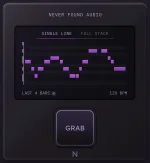
Spotify's Basic Pitch can accept a voice recording and generate MIDI containing detected notes and pitch bends. Humming works because a solo voice is normally monophonic, so the converter has one main pitch line to follow instead of a chord stack.
The rough take still matters more than people expect. A clean little phone memo can produce better MIDI than a polished vocal buried in room sound, backing music, breath noise, and long reverberant tails.
A short dry take also gives MG-Mini's Single Line vocal capture workflow a simpler job. You are not trying to make a nice vocal recording here. You are trying to make the melody painfully obvious.
Stay roughly the same distance from the mic and keep the room quiet. Backing tracks are especially unhelpful because the converter now has to decide which pitched sound belongs to your melody, and even robust singing-transcription systems treat accompaniment as a real source of difficulty.
Closed-mouth humming can work, but a simple open vowel or soft “la” often gives you clearer note attacks when repeated pitches matter. Hard consonants can create extra transients, though, so turning every note into an aggressive “da” may swap one problem for another.
Repeated notes deserve special treatment. Two Gs sung back to back with no breath, consonant, or pitch break can look like one long G because the pitch track barely changes between them. Singing-transcription work has documented this exact under-segmentation problem when successive notes flow together without a clear boundary.
A tiny separation is useful when the melody genuinely contains repeated pitches. Do not turn the phrase into robotic staccato, but give the second note an audible new attack instead of expecting the software to infer a boundary you barely performed.
This is where a hummed idea can turn into a piano roll full of annoying little fragments. The converter may hear the slide into a note as another event, split a held note when the pitch wobbles, or place the note center a semitone away from what you meant.
Do not start by snapping every pitch to a scale. Listen to the hum beside the MIDI first and decide whether the wrong note came from the transcription or from the performance itself. Those are different problems, and automatic correction can hide which one actually happened.
Long scoops are worth shortening when your goal is idea capture rather than preserving vocal expression. Hold the intended pitch long enough for its center to be obvious, especially on short notes where the transition can occupy a large chunk of the whole event.
Breaths and background noises can also turn into tiny false notes. Delete those before doing detailed timing work. Cleaning five obvious garbage events first is faster than quantizing a messy clip and then wondering why the grid still looks ridiculous.
A wrong boundary can be almost invisible on a soft pad and painfully obvious on a short pluck. The same goes for overlapping notes. A monophonic bass patch may cut or glide between them, while a polyphonic synth can play both and make a tiny transcription overlap sound like an accidental chord.
Fix pitch identity first, then repeated-note splits, then obvious starts and endings. Leave small timing differences alone when they match the original phrase. The point is usable MIDI, not a piano roll that looks disinfected.
Scale snapping needs restraint too. If the melody uses a chromatic passing note or you hummed a pitch slightly between semitones before settling, forcing every event into the nearest scale tone can rewrite the hook instead of cleaning it. Correct what you can actually hear as wrong.
Keep the untouched conversion on a muted track while editing a copy. It gives you a fast reference when cleanup starts changing the melody itself, especially after scale snapping or heavy quantization has made everything technically tidy but musically less like the idea you sang.
The rough take still matters more than people expect. A clean little phone memo can produce better MIDI than a polished vocal buried in room sound, backing music, breath noise, and long reverberant tails.
A short dry take also gives MG-Mini's Single Line vocal capture workflow a simpler job. You are not trying to make a nice vocal recording here. You are trying to make the melody painfully obvious.
Clean humming gives the detector fewer decisions
Start with one phrase, not the whole song idea. Ten clean seconds are easier to inspect than a two-minute memo full of talking, false starts, chair noise, and three versions of the same hook.Stay roughly the same distance from the mic and keep the room quiet. Backing tracks are especially unhelpful because the converter now has to decide which pitched sound belongs to your melody, and even robust singing-transcription systems treat accompaniment as a real source of difficulty.
Closed-mouth humming can work, but a simple open vowel or soft “la” often gives you clearer note attacks when repeated pitches matter. Hard consonants can create extra transients, though, so turning every note into an aggressive “da” may swap one problem for another.
Repeated notes deserve special treatment. Two Gs sung back to back with no breath, consonant, or pitch break can look like one long G because the pitch track barely changes between them. Singing-transcription work has documented this exact under-segmentation problem when successive notes flow together without a clear boundary.
A tiny separation is useful when the melody genuinely contains repeated pitches. Do not turn the phrase into robotic staccato, but give the second note an audible new attack instead of expecting the software to infer a boundary you barely performed.
Vocal pitch movement can become fake MIDI notes
Human voices rarely teleport from one perfectly centered pitch to the next. Scoops, drift, vibrato, and portamento move through frequencies on the way into and out of a note, which is why note-level singing melody transcription still has to deal with ambiguous note beginnings, endings, timbre, and vibrato.This is where a hummed idea can turn into a piano roll full of annoying little fragments. The converter may hear the slide into a note as another event, split a held note when the pitch wobbles, or place the note center a semitone away from what you meant.
Do not start by snapping every pitch to a scale. Listen to the hum beside the MIDI first and decide whether the wrong note came from the transcription or from the performance itself. Those are different problems, and automatic correction can hide which one actually happened.
Long scoops are worth shortening when your goal is idea capture rather than preserving vocal expression. Hold the intended pitch long enough for its center to be obvious, especially on short notes where the transition can occupy a large chunk of the whole event.
Breaths and background noises can also turn into tiny false notes. Delete those before doing detailed timing work. Cleaning five obvious garbage events first is faster than quantizing a messy clip and then wondering why the grid still looks ridiculous.
The destination instrument exposes the useful mistakes
Drop the MIDI onto the sound you actually wanted when you hummed the idea. A piano, pluck, bass, or synth lead makes different errors obvious because each patch reacts differently to note length, overlap, velocity, and pitch placement.A wrong boundary can be almost invisible on a soft pad and painfully obvious on a short pluck. The same goes for overlapping notes. A monophonic bass patch may cut or glide between them, while a polyphonic synth can play both and make a tiny transcription overlap sound like an accidental chord.
Fix pitch identity first, then repeated-note splits, then obvious starts and endings. Leave small timing differences alone when they match the original phrase. The point is usable MIDI, not a piano roll that looks disinfected.
Scale snapping needs restraint too. If the melody uses a chromatic passing note or you hummed a pitch slightly between semitones before settling, forcing every event into the nearest scale tone can rewrite the hook instead of cleaning it. Correct what you can actually hear as wrong.
Keep the untouched conversion on a muted track while editing a copy. It gives you a fast reference when cleanup starts changing the melody itself, especially after scale snapping or heavy quantization has made everything technically tidy but musically less like the idea you sang.