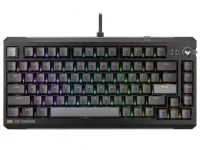
ASUS lets the TUF Gaming K4 Magnetic move its actuation point in 0.01mm steps across a 0.1mm to 3.3mm range. Fine control is useful, but the smallest number in the software is not automatically the smallest physical movement the keyboard can distinguish reliably.
The TUF Gaming K4 Magnetic actuation controls give you a much finer slider than a fixed mechanical switch. Moving from 0.50mm to 0.51mm is still a valid software setting, yet the displayed difference alone does not prove that two physical keypresses will separate cleanly by one hundredth of a millimeter.
A better way to read the specification is as adjustment granularity. It tells you how finely the requested trigger point can be configured, not the measured accuracy, repeatability, or resolution of the complete switch and sensor system.
The underlying mechanism matters because magnet-to-sensor movement changes the Hall sensor output rather than producing a direct millimeter measurement. Firmware has to map that electrical signal onto useful positions, then decide when the configured actuation threshold has been crossed.
Several separate qualities get bundled into the word precision. Absolute accuracy asks whether a setting such as 0.50mm really activates at 0.50mm of physical travel. Repeatability asks whether the same key triggers at nearly the same place across repeated presses.
Key-to-key consistency is another problem. Two switches set to the same value can have small differences in magnet strength, stem travel, alignment, sensor response, or calibration, so identical software values do not automatically produce identical physical trigger depths.
Independent adjustable-keyboard testing has found this distinction in practice. Very fine software increments can coexist with larger differences between the configured setpoint and the measured physical actuation point, and repeated presses can vary by more than the smallest step exposed in software.
This is also why replacing a magnetic switch can require recalibration. A new switch can alter the magnetic range seen by the sensor even when its housing fits perfectly, so reusing the old mapping may shift where a displayed actuation value occurs physically.
Temperature, tolerances, mechanical wobble, magnet variation, and sensor characteristics can all influence the raw signal. Good firmware can compensate for much of this, filter noise, and maintain stable thresholds, but a 0.01mm menu step by itself says nothing about how well those jobs are done.
Dead zones matter as well. The very top or bottom of a switch's travel may contain a region where movement does not produce a useful change in reported position, which limits how much of the physical travel can be used for adjustable input.
Rapid Trigger adds another distinction. Its sensitivity can describe how much movement is needed to reset or reactivate relative to the key's recent position, while a fixed actuation setting describes an absolute threshold in the travel. Both may be shown in tiny millimeter increments without representing the same measurement problem.
The practical benefit appears when neighboring settings produce a repeatable behavioral change, even if the printed millimeter value is not a laboratory-perfect measurement of stem travel. You can tune movement keys shallow, leave typing keys deeper, and back off when resting finger pressure starts causing unwanted inputs.
Extremely small settings also deserve caution. A key configured close to the top of its travel has less physical movement available before activation, so normal finger movement, switch variation, and calibration quality become more noticeable than they are at a deeper threshold.
ASUS currently publishes the K4's adjustment range and 0.01mm increments, but it does not publish an independent measurement showing that every adjacent 0.01mm setting corresponds to a reliably distinct 0.01mm physical actuation change. Treat the number as control resolution unless repeatable instrumented testing demonstrates more.
For actual setup, the useful question is whether the keyboard lets you find a stable trigger point you can control. A setting that reads 0.37mm and behaves consistently is more valuable than chasing 0.01mm simply because the slider allows it.
The TUF Gaming K4 Magnetic actuation controls give you a much finer slider than a fixed mechanical switch. Moving from 0.50mm to 0.51mm is still a valid software setting, yet the displayed difference alone does not prove that two physical keypresses will separate cleanly by one hundredth of a millimeter.
A better way to read the specification is as adjustment granularity. It tells you how finely the requested trigger point can be configured, not the measured accuracy, repeatability, or resolution of the complete switch and sensor system.
Fine software steps and physical accuracy are different things
A Hall-effect keyboard does not measure distance with a tiny ruler under every key. It reads a changing magnetic field and converts the sensor output into an estimate of where the switch sits in its travel.The underlying mechanism matters because magnet-to-sensor movement changes the Hall sensor output rather than producing a direct millimeter measurement. Firmware has to map that electrical signal onto useful positions, then decide when the configured actuation threshold has been crossed.
Several separate qualities get bundled into the word precision. Absolute accuracy asks whether a setting such as 0.50mm really activates at 0.50mm of physical travel. Repeatability asks whether the same key triggers at nearly the same place across repeated presses.
Key-to-key consistency is another problem. Two switches set to the same value can have small differences in magnet strength, stem travel, alignment, sensor response, or calibration, so identical software values do not automatically produce identical physical trigger depths.
Independent adjustable-keyboard testing has found this distinction in practice. Very fine software increments can coexist with larger differences between the configured setpoint and the measured physical actuation point, and repeated presses can vary by more than the smallest step exposed in software.
Calibration decides what the numbers mean
Calibration gives the keyboard reference points for interpreting the magnetic signal. A controller needs to know what the released position looks like electrically, what the bottom of the travel looks like, and how the signal changes between those states.This is also why replacing a magnetic switch can require recalibration. A new switch can alter the magnetic range seen by the sensor even when its housing fits perfectly, so reusing the old mapping may shift where a displayed actuation value occurs physically.
Temperature, tolerances, mechanical wobble, magnet variation, and sensor characteristics can all influence the raw signal. Good firmware can compensate for much of this, filter noise, and maintain stable thresholds, but a 0.01mm menu step by itself says nothing about how well those jobs are done.
Dead zones matter as well. The very top or bottom of a switch's travel may contain a region where movement does not produce a useful change in reported position, which limits how much of the physical travel can be used for adjustable input.
Rapid Trigger adds another distinction. Its sensitivity can describe how much movement is needed to reset or reactivate relative to the key's recent position, while a fixed actuation setting describes an absolute threshold in the travel. Both may be shown in tiny millimeter increments without representing the same measurement problem.
Tiny increments are still useful when you tune by feel
None of this makes fine adjustment pointless. Smaller steps let you creep toward a setting that feels responsive without jumping from a comfortable value straight into accidental keypress territory.The practical benefit appears when neighboring settings produce a repeatable behavioral change, even if the printed millimeter value is not a laboratory-perfect measurement of stem travel. You can tune movement keys shallow, leave typing keys deeper, and back off when resting finger pressure starts causing unwanted inputs.
Extremely small settings also deserve caution. A key configured close to the top of its travel has less physical movement available before activation, so normal finger movement, switch variation, and calibration quality become more noticeable than they are at a deeper threshold.
ASUS currently publishes the K4's adjustment range and 0.01mm increments, but it does not publish an independent measurement showing that every adjacent 0.01mm setting corresponds to a reliably distinct 0.01mm physical actuation change. Treat the number as control resolution unless repeatable instrumented testing demonstrates more.
For actual setup, the useful question is whether the keyboard lets you find a stable trigger point you can control. A setting that reads 0.37mm and behaves consistently is more valuable than chasing 0.01mm simply because the slider allows it.