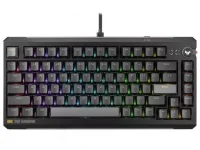
ASUS rates the TUF Gaming K4 Magnetic at 8000Hz polling, which means a USB report interval of 0.125 milliseconds. The figure is real, but it describes one timing window inside a much longer input path.
A keypress still has to be sensed, processed by the keyboard, placed into a USB report, received by the PC, handled by software, and eventually reflected by the game. Calling the 0.125ms interval total keyboard latency quietly skips most of those stages.
The TUF Gaming K4 Magnetic input hardware uses a high-speed USB microcontroller for 8000Hz reporting. ASUS does not state an internal key-scan rate on its current product page, so the USB number alone cannot tell you how frequently the board samples every switch.
Those intervals are ceilings for the polling wait, not a promise that every press spends exactly that long waiting. If a fresh input arrives just before the next report, the polling delay can be close to zero. If it arrives just after one, it waits almost the full interval.
For randomly timed presses, the average wait is roughly half the interval. A 1000Hz connection therefore contributes about 0.5ms of average polling wait, while 8000Hz contributes about 0.0625ms. The average theoretical reduction is around 0.4375ms, even though the difference between the two maximum intervals is 0.875ms.
This distinction matters because spec sheets often place 8000Hz beside 0.125ms in a way that looks like a measured end-to-end result. It is better read as bus timing. Real keyboard latency requires a measurement that starts with physical switch movement and ends at a defined point after the computer receives the event.
A keyboard still needs fresh data ready for those service opportunities. USB can ask eight thousand times per second, yet the benefit shrinks if the keyboard scans its switches, converts sensor readings, or processes firmware logic at a slower pace.
This is why scan rate and polling rate should not be treated as synonyms. A genuinely synchronized design can scan, process, and prepare a fresh report for each USB interval. A board can also advertise an 8000Hz USB connection without publicly specifying whether every internal stage runs at the same cadence.
Magnetic switches add another layer. The controller must interpret an analog position signal before features such as adjustable actuation or Rapid Trigger can act on it. Fast reporting is useful only after the keyboard has detected and processed the change you made with your finger.
Competitive aiming lives inside the measured input-to-output latency path, where local system delay is treated as the time between an action and the visible response. Polling contributes to that path, but it cannot define the whole number by itself.
An 8000Hz setting can still be useful. It reduces the window in which a completed keyboard event waits for the next USB report, and it makes the timing of reports more granular than 1000Hz. The improvement is small enough, though, that firmware quality and switch processing can easily matter more than the headline frequency.
Higher polling also asks the host to service input more often. On a modern gaming PC, the cost may be modest, but there is no reason to assume eight times the report frequency is free on every system or in every game.
Frame timing introduces another boundary. A report can reach the PC quickly and still arrive just after a game has sampled input for its current update, leaving the action to wait for the next opportunity. Faster polling reduces one source of timing uncertainty, but it cannot force the game engine or display to consume the event immediately. Those downstream schedules operate on their own clocks.
The clean way to read the K4 specification is narrow and literal. Its 8000Hz mode gives the USB side a 0.125ms reporting interval. It does not, by itself, prove a 0.125ms physical-keypress-to-game response time, and ASUS does not publish enough internal timing detail to calculate that total from the product page alone.
A keypress still has to be sensed, processed by the keyboard, placed into a USB report, received by the PC, handled by software, and eventually reflected by the game. Calling the 0.125ms interval total keyboard latency quietly skips most of those stages.
The TUF Gaming K4 Magnetic input hardware uses a high-speed USB microcontroller for 8000Hz reporting. ASUS does not state an internal key-scan rate on its current product page, so the USB number alone cannot tell you how frequently the board samples every switch.
The 0.125ms number belongs to one stage
Polling rate is simple arithmetic. A 1000Hz device has one reporting opportunity every millisecond, while an 8000Hz device has one every 0.125ms.Those intervals are ceilings for the polling wait, not a promise that every press spends exactly that long waiting. If a fresh input arrives just before the next report, the polling delay can be close to zero. If it arrives just after one, it waits almost the full interval.
For randomly timed presses, the average wait is roughly half the interval. A 1000Hz connection therefore contributes about 0.5ms of average polling wait, while 8000Hz contributes about 0.0625ms. The average theoretical reduction is around 0.4375ms, even though the difference between the two maximum intervals is 0.875ms.
This distinction matters because spec sheets often place 8000Hz beside 0.125ms in a way that looks like a measured end-to-end result. It is better read as bus timing. Real keyboard latency requires a measurement that starts with physical switch movement and ends at a defined point after the computer receives the event.
Fast USB reporting can outrun key scanning
The 125-microsecond rhythm is not an arbitrary marketing number. High-speed USB works with 125-microsecond microframes, and an interrupt endpoint can be serviced once per microframe when configured for the shortest high-speed interval.A keyboard still needs fresh data ready for those service opportunities. USB can ask eight thousand times per second, yet the benefit shrinks if the keyboard scans its switches, converts sensor readings, or processes firmware logic at a slower pace.
This is why scan rate and polling rate should not be treated as synonyms. A genuinely synchronized design can scan, process, and prepare a fresh report for each USB interval. A board can also advertise an 8000Hz USB connection without publicly specifying whether every internal stage runs at the same cadence.
Magnetic switches add another layer. The controller must interpret an analog position signal before features such as adjustable actuation or Rapid Trigger can act on it. Fast reporting is useful only after the keyboard has detected and processed the change you made with your finger.
Lower polling delay is only part of game latency
Once the report reaches the computer, the race is not over. Operating-system scheduling, the game's input loop, simulation timing, frame production, display scanout, and the monitor all sit downstream from the keyboard.Competitive aiming lives inside the measured input-to-output latency path, where local system delay is treated as the time between an action and the visible response. Polling contributes to that path, but it cannot define the whole number by itself.
An 8000Hz setting can still be useful. It reduces the window in which a completed keyboard event waits for the next USB report, and it makes the timing of reports more granular than 1000Hz. The improvement is small enough, though, that firmware quality and switch processing can easily matter more than the headline frequency.
Higher polling also asks the host to service input more often. On a modern gaming PC, the cost may be modest, but there is no reason to assume eight times the report frequency is free on every system or in every game.
Frame timing introduces another boundary. A report can reach the PC quickly and still arrive just after a game has sampled input for its current update, leaving the action to wait for the next opportunity. Faster polling reduces one source of timing uncertainty, but it cannot force the game engine or display to consume the event immediately. Those downstream schedules operate on their own clocks.
The clean way to read the K4 specification is narrow and literal. Its 8000Hz mode gives the USB side a 0.125ms reporting interval. It does not, by itself, prove a 0.125ms physical-keypress-to-game response time, and ASUS does not publish enough internal timing detail to calculate that total from the product page alone.