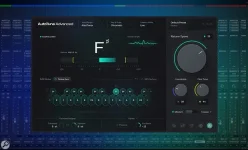
AutoTune corrects a vocal toward the notes allowed by the key and scale you select, so a wrong map creates wrong targets. An AutoTune key finder is useful because it gets you to a plausible starting point quickly, but the detected label still needs a musical sanity check before you tune the lead.
The safest habit is to find the AutoTune key from the beat or instrumental, not from a shaky dry vocal. A chord-heavy hook usually gives an AutoTune key detector more useful tonal information than a sparse intro, drum break, or one-note bass passage. Once the key is believable, the AutoTune retune speed for natural vocal correction becomes a separate choice about how quickly the voice moves toward those targets.
FL Studio users have another route. If you are working out how to find the AutoTune key in FL Studio, inspect the notes or chords already in the project and use pitch-detection tools as evidence rather than treating one detected note as the song key. AutoTune Go in FL Studio still needs the correct key and scale, just like another automatic tuner.
An AutoTune key chart or AutoTune key wheel can help when the detector gives you an unfamiliar spelling. G sharp and A flat refer to the same sounding pitch in equal temperament, but the spelling around it can make the actual scale easier to read. The bigger distinction is the AutoTune key and scale combination, because choosing the root without choosing the right note collection does not define the correction map.
If you are deciding how to know what AutoTune key to use, listen for where the progression and melody feel resolved instead of trusting the first chord, first bass note, or file name. A beat can contain notes that belong to the overall scale yet pull differently against the chord sounding at that moment. The same issue shows up when scale notes meet changing chords, which is why an in-key label alone cannot judge every melodic target.
A correct key can also sound consistently wrong when the tuning reference is different. Reference tuning at 432 Hz is a clean example because the key name can remain unchanged while every target frequency shifts. If AutoTune sounds off-key across nearly every note, check the reference pitch before randomly changing the scale.
There is no best AutoTune key for singing in general. The right setting comes from the song, not the singer's range, genre, or vocal tone. A key finder can identify the harmonic framework, while vocal-range controls deal with a different problem, namely helping the pitch detector interpret the source itself. Key finder and scale definition are worth keeping separate for the same reason.
A real AutoTune key change needs a real change in the correction map. If the bridge modulates, one fixed key can make the verse behave, and the bridge fight back, so split the sections or automate the AutoTune key where your plugin and DAW allow it. Learning how to automate the AutoTune key is more useful than forcing Chromatic mode across the whole song just to avoid one difficult section.
The safest habit is to find the AutoTune key from the beat or instrumental, not from a shaky dry vocal. A chord-heavy hook usually gives an AutoTune key detector more useful tonal information than a sparse intro, drum break, or one-note bass passage. Once the key is believable, the AutoTune retune speed for natural vocal correction becomes a separate choice about how quickly the voice moves toward those targets.
Use the beat to find the correction map
Start with the clearest section of the instrumental and run it through whatever tool fits your setup. A VST AutoTune key finder can stay inside the session, while a browser-based AutoTune key tool is handy when you only have a bounced beat. A free AutoTune key finder can be perfectly useful here because you need a candidate key first, not software pretending to make the final harmonic decision for you.FL Studio users have another route. If you are working out how to find the AutoTune key in FL Studio, inspect the notes or chords already in the project and use pitch-detection tools as evidence rather than treating one detected note as the song key. AutoTune Go in FL Studio still needs the correct key and scale, just like another automatic tuner.
An AutoTune key chart or AutoTune key wheel can help when the detector gives you an unfamiliar spelling. G sharp and A flat refer to the same sounding pitch in equal temperament, but the spelling around it can make the actual scale easier to read. The bigger distinction is the AutoTune key and scale combination, because choosing the root without choosing the right note collection does not define the correction map.
Key names can be right while the result sounds wrong
Automatic key detection is not infallible, especially when two closely related keys share much of the same material. C major and A natural minor contain the same seven note names, so a tuner constrained only to those pitch classes sees the same allowed notes even though the tonal center is different. Relative major and minor keys become important once harmony, phrasing, custom scales, or communication with collaborators enters the picture.If you are deciding how to know what AutoTune key to use, listen for where the progression and melody feel resolved instead of trusting the first chord, first bass note, or file name. A beat can contain notes that belong to the overall scale yet pull differently against the chord sounding at that moment. The same issue shows up when scale notes meet changing chords, which is why an in-key label alone cannot judge every melodic target.
A correct key can also sound consistently wrong when the tuning reference is different. Reference tuning at 432 Hz is a clean example because the key name can remain unchanged while every target frequency shifts. If AutoTune sounds off-key across nearly every note, check the reference pitch before randomly changing the scale.
Change the map when the song changes
Knowing how to set the AutoTune key is straightforward once the harmonic answer is stable. Pick the root and scale that match the song, then audition a phrase containing several real melody notes. If a key finder result is wrong, or another detector keeps choosing a result that produces sour corrections, analyze a different section and compare the candidate against the actual chords.There is no best AutoTune key for singing in general. The right setting comes from the song, not the singer's range, genre, or vocal tone. A key finder can identify the harmonic framework, while vocal-range controls deal with a different problem, namely helping the pitch detector interpret the source itself. Key finder and scale definition are worth keeping separate for the same reason.
A real AutoTune key change needs a real change in the correction map. If the bridge modulates, one fixed key can make the verse behave, and the bridge fight back, so split the sections or automate the AutoTune key where your plugin and DAW allow it. Learning how to automate the AutoTune key is more useful than forcing Chromatic mode across the whole song just to avoid one difficult section.