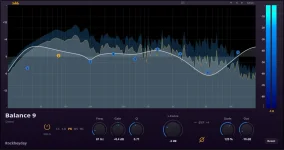
Balance 9 uses a zero-latency minimum-phase IIR architecture, so the EQ itself does not add another reported processing delay while you monitor. The claim sounds simple inside an actual recording session. The interface, converters, driver, buffers, routing, and other plug-ins are all still doing their own work.
The useful part of Balance 9’s zero-latency EQ design is pretty specific. You can put the EQ on a live vocal, guitar, synth, or other monitored input without the EQ becoming another deliberate delay stage in the chain.
So you can load Balance 9 and still feel lag. The first thing to check is not the EQ. Check the buffer, the interface driver, the session routing, and every other processor sitting between the armed track and the monitor output.
At 48 kHz, a 64-sample buffer represents about 1.33 milliseconds of audio in one direction. A 256-sample buffer represents about 5.33 milliseconds before you even start accounting for the rest of the path. Real round-trip latency is higher because input and output conversion, drivers, safety buffers, and hardware behavior do not disappear.
Raising the sample rate can shorten the time represented by the same buffer size, but it also asks more from the CPU and your plug-ins. A session may start crackling at the lower buffer you actually want for tracking. Pushing the sample rate higher can turn one latency fix into a stability problem somewhere else.
A hardware round-trip latency test makes the distinction easy to see. Buffer size is one piece of the delay, not a magic readout for the entire trip from microphone to DAW and back to headphones.
You still get phase rotation around the frequencies being changed. Nothing weird there. A minimum-phase EQ trades the phase behavior of the filter for immediacy, while linear-phase approaches trade immediacy for a different phase response and usually add meaningful delay.
For tracking, the practical win is boring in a good way. Balance 9 can shape a harsh headphone vocal, trim mud from a monitored guitar, or clean up a synth. None of those moves stacks its own deliberate processing delay on top of the interface path.
Plugin latency versus buffer size also matters when the rest of the session gets heavy. A 64-sample interface buffer does not save you if a look-ahead limiter, linear-phase EQ, pitch processor, or another latency-heavy plug-in sits later in the monitored signal path.
A master bus is easy to forget here. You can have a clean record channel with Balance 9 reporting no added latency, then route it into a bus carrying a mastering limiter. If the limiter needs look-ahead, the performer still hears the delayed result because the monitored path includes the whole route.
Low-latency modes in major DAWs deal with the problem by bypassing or limiting latency-heavy processing on record paths. Balance 9 is useful here because its own EQ stage is not the processor forcing the DAW to wait. Another plug-in on the track, bus, or master can still ruin the feel.
Direct monitoring changes the situation again. Your interface can send the input straight to the headphones before the DAW round trip, which can cut latency sharply. A Balance 9 insert inside the DAW will not normally be part of what you hear on that direct path.
Software monitoring is where the plug-in earns the zero-latency label. Keep the buffer as low as your session can run cleanly and remove high-latency processors from the monitored route. Use Balance 9 where you actually need corrective EQ while performing. If the session still feels late, the remaining delay is somewhere else in the chain, not hidden inside the nine EQ bands.
The useful part of Balance 9’s zero-latency EQ design is pretty specific. You can put the EQ on a live vocal, guitar, synth, or other monitored input without the EQ becoming another deliberate delay stage in the chain.
Zero latency describes the plug-in, not the whole path
A zero-latency EQ for recording does not mean the sound reaches your headphones at sample zero. Your input still enters the interface and passes through conversion, driver handling, and the DAW’s audio buffer. Balance 9 sits inside a much longer trip back to your headphones.So you can load Balance 9 and still feel lag. The first thing to check is not the EQ. Check the buffer, the interface driver, the session routing, and every other processor sitting between the armed track and the monitor output.
At 48 kHz, a 64-sample buffer represents about 1.33 milliseconds of audio in one direction. A 256-sample buffer represents about 5.33 milliseconds before you even start accounting for the rest of the path. Real round-trip latency is higher because input and output conversion, drivers, safety buffers, and hardware behavior do not disappear.
Raising the sample rate can shorten the time represented by the same buffer size, but it also asks more from the CPU and your plug-ins. A session may start crackling at the lower buffer you actually want for tracking. Pushing the sample rate higher can turn one latency fix into a stability problem somewhere else.
A hardware round-trip latency test makes the distinction easy to see. Buffer size is one piece of the delay, not a magic readout for the entire trip from microphone to DAW and back to headphones.
Minimum-phase EQ avoids one expensive trade
Balance 9 gets its no-added-latency behavior from a minimum-phase IIR design rather than a linear-phase process that needs extra time alignment. Classic digital parametric EQ filter design uses causal recursive structures that can operate as samples arrive. Processing built around future samples or longer buffered windows is doing a different job.You still get phase rotation around the frequencies being changed. Nothing weird there. A minimum-phase EQ trades the phase behavior of the filter for immediacy, while linear-phase approaches trade immediacy for a different phase response and usually add meaningful delay.
For tracking, the practical win is boring in a good way. Balance 9 can shape a harsh headphone vocal, trim mud from a monitored guitar, or clean up a synth. None of those moves stacks its own deliberate processing delay on top of the interface path.
Plugin latency versus buffer size also matters when the rest of the session gets heavy. A 64-sample interface buffer does not save you if a look-ahead limiter, linear-phase EQ, pitch processor, or another latency-heavy plug-in sits later in the monitored signal path.
A master bus is easy to forget here. You can have a clean record channel with Balance 9 reporting no added latency, then route it into a bus carrying a mastering limiter. If the limiter needs look-ahead, the performer still hears the delayed result because the monitored path includes the whole route.
Delay compensation cannot make monitoring instantaneous
DAW plugin delay compensation keeps playback paths lined up by accounting for processors that report latency. It is great when twenty tracks need to arrive together. It cannot make a delayed live monitoring path instantaneous because your voice or instrument still travels through the active processing chain before you hear it.Low-latency modes in major DAWs deal with the problem by bypassing or limiting latency-heavy processing on record paths. Balance 9 is useful here because its own EQ stage is not the processor forcing the DAW to wait. Another plug-in on the track, bus, or master can still ruin the feel.
Direct monitoring changes the situation again. Your interface can send the input straight to the headphones before the DAW round trip, which can cut latency sharply. A Balance 9 insert inside the DAW will not normally be part of what you hear on that direct path.
Software monitoring is where the plug-in earns the zero-latency label. Keep the buffer as low as your session can run cleanly and remove high-latency processors from the monitored route. Use Balance 9 where you actually need corrective EQ while performing. If the session still feels late, the remaining delay is somewhere else in the chain, not hidden inside the nine EQ bands.