Initial Audio has upgraded Difro Melody AI to version 2.5, adding a way to turn audio loops into MIDI notes. Producers also get plugin support for their DAWs, new playback controls, and a batch of fixes aimed at daily use.
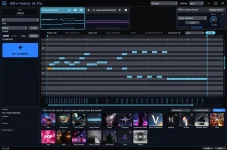
The audio conversion is quite simple. A user drops a melodic clip into Difro's piano roll, and the app maps the notes and their velocity. It runs on the local computer, with no cloud step needed for that task.
There is a limit, though. Difro handles up to 16 bars of audio per conversion. Any extra length gets cut off. Once the notes are in MIDI form, the Re-Imagine feature can make fresh takes on the same musical idea.
And the DAW side gets a real upgrade. Difro can run as a VST3 or AU plugin, with its output locked to the host's timing. It can send MIDI, audio, or both as the project plays, rather than making users rely on a separate workflow.
For those who want to use their own synths, a mute control beneath the master gain turns off Difro's sound while keeping MIDI active. The notes can then travel through the DAW to another instrument.
MIDI keyboards get more use as well. Producers can trigger Difro with notes and use a latch setting to keep playback active. That adds a hands-on way to try ideas without having to start each part from the screen.
The interface has had some work, thankfully. Users can resize parts of the layout, adjust screen brightness and contrast, and move through the app with less lag. A new guided tutorial also helps first-time users find their way around.
On the hardware side, Windows users with recent NVIDIA Blackwell graphics cards gain support. Older Maxwell cards lose it. The app also needs 300 MB less space for its download and memory use.
File naming is more useful as well. When users drag an audio export out of Difro, its name can show the key, scale, and BPM. That makes clips easier to sort when a project has lots of takes.
A few annoying bugs have been dealt with. Initial Audio fixed cases where Windows admin rights caused trouble for the generation DLL, along with failures on some older CPUs. It also tackled an app freeze during shutdown.
Audio export got attention as well. A bug that left silence at the start of WAV renders has been fixed, and loop settings should no longer force the wrong generation length.
Difro still has a free option with a monthly cap on AI generations. There is no need to pay a recurring fee for that tier. Users who want to generate ideas without that cap can choose the Pro edition.
The update gives producers a more direct route from audio ideas to editable notes, with fewer steps between Difro and their music software.
The audio conversion is quite simple. A user drops a melodic clip into Difro's piano roll, and the app maps the notes and their velocity. It runs on the local computer, with no cloud step needed for that task.
There is a limit, though. Difro handles up to 16 bars of audio per conversion. Any extra length gets cut off. Once the notes are in MIDI form, the Re-Imagine feature can make fresh takes on the same musical idea.
And the DAW side gets a real upgrade. Difro can run as a VST3 or AU plugin, with its output locked to the host's timing. It can send MIDI, audio, or both as the project plays, rather than making users rely on a separate workflow.
For those who want to use their own synths, a mute control beneath the master gain turns off Difro's sound while keeping MIDI active. The notes can then travel through the DAW to another instrument.
MIDI keyboards get more use as well. Producers can trigger Difro with notes and use a latch setting to keep playback active. That adds a hands-on way to try ideas without having to start each part from the screen.
The interface has had some work, thankfully. Users can resize parts of the layout, adjust screen brightness and contrast, and move through the app with less lag. A new guided tutorial also helps first-time users find their way around.
On the hardware side, Windows users with recent NVIDIA Blackwell graphics cards gain support. Older Maxwell cards lose it. The app also needs 300 MB less space for its download and memory use.
File naming is more useful as well. When users drag an audio export out of Difro, its name can show the key, scale, and BPM. That makes clips easier to sort when a project has lots of takes.
A few annoying bugs have been dealt with. Initial Audio fixed cases where Windows admin rights caused trouble for the generation DLL, along with failures on some older CPUs. It also tackled an app freeze during shutdown.
Audio export got attention as well. A bug that left silence at the start of WAV renders has been fixed, and loop settings should no longer force the wrong generation length.
Difro still has a free option with a monthly cap on AI generations. There is no need to pay a recurring fee for that tier. Users who want to generate ideas without that cap can choose the Pro edition.
The update gives producers a more direct route from audio ideas to editable notes, with fewer steps between Difro and their music software.