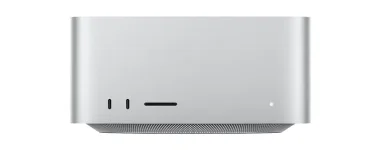
Apple sells the M5 Max Mac Studio with 512GB to 8TB of SSD storage, while M5 Ultra stretches from 1TB to 16TB. Those ceilings look huge until sample libraries, old sessions, bounced stems, installers, and backups start piling up on the same drive.
Going straight for the biggest internal SSD is the cleanest setup, but it is not automatically the smartest use of money. A studio machine can keep macOS, apps, plug-ins, current projects, and everyday files internally while bulky libraries live on fast external storage without turning the desk into a slow mess.
The M5 Mac Studio audio workstation already has four rear Thunderbolt 5 ports, so external storage is not some awkward fallback. The useful decision is what deserves the fixed internal drive and what can move elsewhere without making sessions fragile.
One or two terabytes makes the internal drive much easier to live with because the machine can hold the software layer and a healthy batch of active projects without constant housekeeping. Larger capacities start making more sense when you want the entire working studio self-contained, travel with the machine, or regularly handle projects that generate hundreds of gigabytes of audio.
Keeping active sessions internal also removes one small failure point. Forgetting to mount an external project drive cannot break a session path if the session is already on the system SSD, and moving a Mac between rooms becomes less annoying.
Logic projects can reference audio stored outside the project package, though, so organization still matters. A session file is not automatically proof that every recording, edit, or imported sample it needs has travelled with it.
Drive format matters too. With Logic Pro 12, Apple says an APFS external drive can clone the consolidated library in place without extra storage, while Mac OS Extended or ExFAT can temporarily need enough room for both the old files and the new bundle. A nearly full sample SSD can hit this migration trap.
This makes a dedicated external SSD a sensible home for large factory content and third-party libraries, especially on a Mac Studio that rarely leaves the desk. Kontakt, orchestral collections, drum libraries, and multi-mic instruments can consume terabytes while the actual plug-in application remains tiny.
Sample playback also does not require loading every byte of a library before one note can sound. Techniques such as sample-head preloading and disk playback keep the attack portion ready in faster memory while longer sample data is pulled from storage as playback continues.
Storage speed still matters once many voices are streaming at once, but the Thunderbolt 5 label should not bully you into buying the most expensive enclosure on the shelf. The bus can handle up to 120Gb/s, yet the real transfer rate is limited by the SSD, enclosure, protocol, workload, and thermal behavior sitting behind it.
A good external SSD therefore needs consistent performance more than an impressive peak number. Sample libraries mostly reward predictable reads, while huge copy jobs and video work are more likely to expose the difference between a merely fast drive and a very fast one.
Active projects should exist in at least one other place that does not share the same failure. A second local drive is useful for quick recovery, while another physical location or a reputable cloud backup protects against theft, electrical damage, or one bad afternoon involving the entire desk.
Archives deserve their own lane too. Finished projects do not need to occupy premium internal SSD space forever, but moving them off the Mac only works if the archive contains the audio and assets required to reopen them rather than a lonely project file pointing at folders that no longer exist.
Going straight for the biggest internal SSD is the cleanest setup, but it is not automatically the smartest use of money. A studio machine can keep macOS, apps, plug-ins, current projects, and everyday files internally while bulky libraries live on fast external storage without turning the desk into a slow mess.
The M5 Mac Studio audio workstation already has four rear Thunderbolt 5 ports, so external storage is not some awkward fallback. The useful decision is what deserves the fixed internal drive and what can move elsewhere without making sessions fragile.
Internal storage works best as the fixed core
A 512GB M5 Max can work for a lean setup, but free space disappears quickly once the operating system, Logic, plug-ins, downloads, project caches, and local media all settle in. Producers who keep years of sessions on the desktop also tend to discover that “temporary” exports have a surprisingly long life.One or two terabytes makes the internal drive much easier to live with because the machine can hold the software layer and a healthy batch of active projects without constant housekeeping. Larger capacities start making more sense when you want the entire working studio self-contained, travel with the machine, or regularly handle projects that generate hundreds of gigabytes of audio.
Keeping active sessions internal also removes one small failure point. Forgetting to mount an external project drive cannot break a session path if the session is already on the system SSD, and moving a Mac between rooms becomes less annoying.
Logic projects can reference audio stored outside the project package, though, so organization still matters. A session file is not automatically proof that every recording, edit, or imported sample it needs has travelled with it.
Sample libraries can live somewhere else
Logic Pro now stores its own sound content inside a Logic Pro Library bundle, and Apple lets you point that library at internal, external, or network storage. If the chosen drive is missing, Logic asks you to locate the library or create a new empty one instead of quietly pretending the content is still there.Drive format matters too. With Logic Pro 12, Apple says an APFS external drive can clone the consolidated library in place without extra storage, while Mac OS Extended or ExFAT can temporarily need enough room for both the old files and the new bundle. A nearly full sample SSD can hit this migration trap.
This makes a dedicated external SSD a sensible home for large factory content and third-party libraries, especially on a Mac Studio that rarely leaves the desk. Kontakt, orchestral collections, drum libraries, and multi-mic instruments can consume terabytes while the actual plug-in application remains tiny.
Sample playback also does not require loading every byte of a library before one note can sound. Techniques such as sample-head preloading and disk playback keep the attack portion ready in faster memory while longer sample data is pulled from storage as playback continues.
Storage speed still matters once many voices are streaming at once, but the Thunderbolt 5 label should not bully you into buying the most expensive enclosure on the shelf. The bus can handle up to 120Gb/s, yet the real transfer rate is limited by the SSD, enclosure, protocol, workload, and thermal behavior sitting behind it.
A good external SSD therefore needs consistent performance more than an impressive peak number. Sample libraries mostly reward predictable reads, while huge copy jobs and video work are more likely to expose the difference between a merely fast drive and a very fast one.
Project storage and backup are different jobs
An external library drive is not a backup just because the same files exist outside the Mac. If a sample vendor lets you redownload everything, losing the drive is mostly an inconvenience, but losing original recordings, custom samples, presets, and finished sessions is a different problem.Active projects should exist in at least one other place that does not share the same failure. A second local drive is useful for quick recovery, while another physical location or a reputable cloud backup protects against theft, electrical damage, or one bad afternoon involving the entire desk.
Archives deserve their own lane too. Finished projects do not need to occupy premium internal SSD space forever, but moving them off the Mac only works if the archive contains the audio and assets required to reopen them rather than a lonely project file pointing at folders that no longer exist.