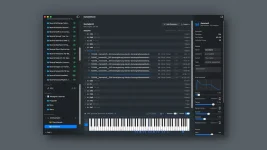
SampleStack can filter a Mac sample library by tags and star ratings while storing BPM, key, source, notes, and other metadata beside each file. Those fields are useful only if each one has a job. Fill everything with whatever comes to mind, and the library slowly turns into a second mess sitting on top of the first.
A workable system starts with one source library and a boring folder structure. Keep broad folders for things you would still understand two years from now, such as drums, loops, instruments, vocals, and effects. Let metadata handle the details that cut across those folders instead of creating six levels of subfolders for every possible description.
The central SampleStack library can then become the place where you browse the collection rather than a prettier view of the same old pack folders. Search works better when the labels describe how you actually look for sounds.
Keep categories broad and stable. Use tags for traits you might combine during a search, such as dry, metallic, soft, distorted, long, foley, acoustic, or punchy. Avoid building a tag for every passing thought. “Punch,” “punchy,” “hard punch,” and “punchier” create four doors into what is basically one room.
A sound-library ontology study describes this exact problem in larger sound collections, where ambiguity, synonyms, and inconsistent annotations make retrieval harder. You do not need a museum-grade taxonomy for kicks and snares, but the same lesson applies. Pick one label for one idea and stick with it.
Batch editing makes the boring part less painful. If a folder contains forty closed hats from the same pack, select them together and add the tags they genuinely share. Leave subjective traits for smaller passes because one pack can contain both dusty and pristine sounds even when the vendor put them in the same folder.
BPM and key need the opposite treatment. Enter them when they help retrieval, not because the boxes exist. Tempo is useful on loops and rhythmic phrases, while a tiny snare hit rarely gains anything from a BPM value. Key matters on basses, melodic one-shots, chords, vocals, and tonal effects, but forcing a musical key onto broadband noise just creates fake precision.
Source deserves more love than it usually gets. Put the pack, recording session, vendor, synth, field recorder, or other origin there when you know it. Months later, finding one perfect texture often makes you want the rest of the material it came with. Source metadata gives you a route back without stuffing the vendor name into every descriptive tag.
Notes are for exceptions rather than taxonomy. Write down things such as “great after pitching down,” “click at original start,” “left channel only,” or “layered with kick 07 in project X.” Free text is useful precisely because it does not need to become another permanent filter.
Keeping those ideas separate matters once the same source library feeds several devices. Device copies belong outside the source structure, with the four-hardware-sampler workflow keeping format changes at export instead of mutating the archive. Your organization survives even when the destination needs another sample rate, bit depth, channel count, filename, or folder layout.
Do the cleanup in passes rather than trying to classify ten thousand files in one heroic weekend. Start with broad categories, then tag the sounds you actually touch, rate favorites as they prove themselves, and add BPM, key, source, or notes when those fields answer a real future search. The useful library is the one that gets smarter while you work.
A workable system starts with one source library and a boring folder structure. Keep broad folders for things you would still understand two years from now, such as drums, loops, instruments, vocals, and effects. Let metadata handle the details that cut across those folders instead of creating six levels of subfolders for every possible description.
The central SampleStack library can then become the place where you browse the collection rather than a prettier view of the same old pack folders. Search works better when the labels describe how you actually look for sounds.
Folders should describe storage while metadata describes sound
Folders are good at answering where a file lives. They get clumsy once one sample belongs to several ideas at once. A dry rimshot might be percussion, acoustic, short, bright, clean, and useful for house, but it cannot physically live in six folders without copies.Keep categories broad and stable. Use tags for traits you might combine during a search, such as dry, metallic, soft, distorted, long, foley, acoustic, or punchy. Avoid building a tag for every passing thought. “Punch,” “punchy,” “hard punch,” and “punchier” create four doors into what is basically one room.
A sound-library ontology study describes this exact problem in larger sound collections, where ambiguity, synonyms, and inconsistent annotations make retrieval harder. You do not need a museum-grade taxonomy for kicks and snares, but the same lesson applies. Pick one label for one idea and stick with it.
Batch editing makes the boring part less painful. If a folder contains forty closed hats from the same pack, select them together and add the tags they genuinely share. Leave subjective traits for smaller passes because one pack can contain both dusty and pristine sounds even when the vendor put them in the same folder.
Ratings should measure usefulness instead of audio quality
A five-star rating becomes pointless if it means “this sample sounds good.” You probably kept the file because it sounded useful in the first place. Rate by how quickly you would reach for it again. Five stars can mean trusted favorite, four can mean strong option, three can mean usable, while the bottom end marks sounds you keep for edge cases.BPM and key need the opposite treatment. Enter them when they help retrieval, not because the boxes exist. Tempo is useful on loops and rhythmic phrases, while a tiny snare hit rarely gains anything from a BPM value. Key matters on basses, melodic one-shots, chords, vocals, and tonal effects, but forcing a musical key onto broadband noise just creates fake precision.
Source deserves more love than it usually gets. Put the pack, recording session, vendor, synth, field recorder, or other origin there when you know it. Months later, finding one perfect texture often makes you want the rest of the material it came with. Source metadata gives you a route back without stuffing the vendor name into every descriptive tag.
Notes are for exceptions rather than taxonomy. Write down things such as “great after pitching down,” “click at original start,” “left channel only,” or “layered with kick 07 in project X.” Free text is useful precisely because it does not need to become another permanent filter.
Validation status should stay separate from creative judgment
SampleStack also shows whether audio is ready for a chosen hardware target, needs conversion, or has a problem. Do not mix that technical state with ratings. A five-star stereo ambience can still be incompatible with a mono hardware target, while a forgettable one-star kick can be technically perfect.Keeping those ideas separate matters once the same source library feeds several devices. Device copies belong outside the source structure, with the four-hardware-sampler workflow keeping format changes at export instead of mutating the archive. Your organization survives even when the destination needs another sample rate, bit depth, channel count, filename, or folder layout.
Do the cleanup in passes rather than trying to classify ten thousand files in one heroic weekend. Start with broad categories, then tag the sounds you actually touch, rate favorites as they prove themselves, and add BPM, key, source, or notes when those fields answer a real future search. The useful library is the one that gets smarter while you work.