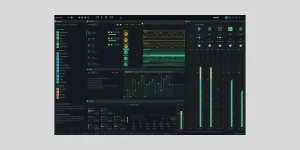
OpenDAW can now import and export DAWproject files, carrying audio, MIDI, devices, sends, routing, and project metadata between compatible DAWs. It gives you a route out of the browser without reducing every track to a rendered audio file.
A browser-based OpenDAW production setup can stay entirely inside OpenDAW, but DAWproject becomes useful when another program needs to pick up the session. You keep editable project structure where the receiving DAW understands it. Very different job from exporting a folder of stems.
The format is meant for music-production interchange. It can describe tracks, channels, audio clips, notes, automation, tempo, time signatures, sends, plug-in states, and other project structure. The receiving DAW then translates those things into its own model.
Stems are still useful when you want certainty about the sound. A rendered vocal or synth stem does not care whether the next DAW understands your routing, clip structure, or devices. DAWproject trades some of that certainty for editability, which suits continuing production rather than simply handing over audio.
An OpenDAW .odb bundle solves another problem again. It is an OpenDAW project package for keeping or restoring the session in OpenDAW, while DAWproject is built for interchange with other software. The OpenDAW cloud backup setup goes deeper on protecting .odb projects and browser-local work instead of moving them into another DAW.
The wider DAWproject format is supported by software including Studio One and Cubase, but support does not mean every application interprets every feature identically. DAWs have different track models, devices, clip systems, routing options, and automation rules. A valid file can still contain structures the destination must flatten or convert.
DAWproject also has deliberate limits that are easy to miss. It is not intended to preserve a DAW's window layout, preferences, or every private host detail. The format focuses on project data another music application has a reasonable chance of understanding.
This is where project metadata surviving a production handoff matters more than simply getting the audio across. Track names, arrangement structure, timing, routing, and editable note data can save a pile of rebuilding when a collaborator opens the project somewhere else.
Save the OpenDAW project first, export a DAWproject copy, then open that copy in the destination DAW and inspect it before doing more work. Keep the original OpenDAW project untouched until you know the transferred version contains what you need. It is a handoff, not a conversion you should immediately trust and overwrite.
A transfer can therefore be technically successful while still needing cleanup. Track hierarchy may be simplified, a device may become generic, or a feature with no matching concept may arrive in a reduced form. Open the result with that expectation and compare the musical parts first.
Devices deserve the closest look. OpenDAW can include device information in its interchange pipeline, but another DAW may have no equivalent for an OpenDAW-native processor. DAWproject itself can carry plug-in state, yet OpenDAW does not currently host ordinary third-party plug-ins, so this should not be mistaken for VST migration out of OpenDAW.
Routing is similar. OpenDAW can export sends and routing information, yet unusual bus layouts or device chains can land differently when the other DAW has no direct equivalent. Check track outputs, sends, group relationships, automation lanes, tempo changes, warped audio, and instrument tracks before treating the imported session as production-ready.
For an OpenDAW to Bitwig transfer, start with a small copy of a real project rather than your only working session. Include a few note clips, audio regions, sends, automation, and one or two devices you actually use. Open the exported .dawproject in Bitwig, compare it with OpenDAW, and note what survives cleanly before moving a bigger session.
A browser-based OpenDAW production setup can stay entirely inside OpenDAW, but DAWproject becomes useful when another program needs to pick up the session. You keep editable project structure where the receiving DAW understands it. Very different job from exporting a folder of stems.
DAWproject keeps more than a folder of stems
A .dawproject file is a ZIP-based interchange package rather than a native OpenDAW session. Inside are XML files for the project and metadata, with media carried alongside them. A compatible DAW can rebuild more of the working session instead of receiving only finished audio.The format is meant for music-production interchange. It can describe tracks, channels, audio clips, notes, automation, tempo, time signatures, sends, plug-in states, and other project structure. The receiving DAW then translates those things into its own model.
Stems are still useful when you want certainty about the sound. A rendered vocal or synth stem does not care whether the next DAW understands your routing, clip structure, or devices. DAWproject trades some of that certainty for editability, which suits continuing production rather than simply handing over audio.
An OpenDAW .odb bundle solves another problem again. It is an OpenDAW project package for keeping or restoring the session in OpenDAW, while DAWproject is built for interchange with other software. The OpenDAW cloud backup setup goes deeper on protecting .odb projects and browser-local work instead of moving them into another DAW.
OpenDAW and Bitwig already have a tested path
OpenDAW's current DAWproject pipeline handles audio, MIDI, devices, sends, routing, and metadata. Its September release notes say export to Bitwig was tested with notes, audio, and devices. Bitwig is therefore the clearest documented destination if you want to try the feature without guessing about basic interchange.The wider DAWproject format is supported by software including Studio One and Cubase, but support does not mean every application interprets every feature identically. DAWs have different track models, devices, clip systems, routing options, and automation rules. A valid file can still contain structures the destination must flatten or convert.
DAWproject also has deliberate limits that are easy to miss. It is not intended to preserve a DAW's window layout, preferences, or every private host detail. The format focuses on project data another music application has a reasonable chance of understanding.
This is where project metadata surviving a production handoff matters more than simply getting the audio across. Track names, arrangement structure, timing, routing, and editable note data can save a pile of rebuilding when a collaborator opens the project somewhere else.
Save the OpenDAW project first, export a DAWproject copy, then open that copy in the destination DAW and inspect it before doing more work. Keep the original OpenDAW project untouched until you know the transferred version contains what you need. It is a handoff, not a conversion you should immediately trust and overwrite.
Some session details still need checking after import
DAWproject is deliberately not a promise to clone one DAW inside another. Its specification excludes application view settings and preferences. The importing application can also flatten or convert project structures to fit its own model.A transfer can therefore be technically successful while still needing cleanup. Track hierarchy may be simplified, a device may become generic, or a feature with no matching concept may arrive in a reduced form. Open the result with that expectation and compare the musical parts first.
Devices deserve the closest look. OpenDAW can include device information in its interchange pipeline, but another DAW may have no equivalent for an OpenDAW-native processor. DAWproject itself can carry plug-in state, yet OpenDAW does not currently host ordinary third-party plug-ins, so this should not be mistaken for VST migration out of OpenDAW.
Routing is similar. OpenDAW can export sends and routing information, yet unusual bus layouts or device chains can land differently when the other DAW has no direct equivalent. Check track outputs, sends, group relationships, automation lanes, tempo changes, warped audio, and instrument tracks before treating the imported session as production-ready.
For an OpenDAW to Bitwig transfer, start with a small copy of a real project rather than your only working session. Include a few note clips, audio regions, sends, automation, and one or two devices you actually use. Open the exported .dawproject in Bitwig, compare it with OpenDAW, and note what survives cleanly before moving a bigger session.