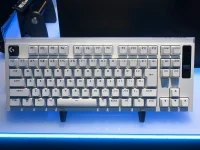
The PRO X2 RAPID uses Hall-effect magnetic switches and can report keyboard input over USB at up to 8,000Hz. Rapid Trigger is a separate control that changes how far a key must move upward before it resets, so lowering actuation and lowering reset distance are not the same adjustment.
The Logitech PRO X2 RAPID magnetic keyboard lets you change actuation and Rapid Trigger from its OLED controls without opening G HUB. Keep those sensitivity choices separate from the headline polling figure because a high polling rate is only one part of keyboard latency, while actuation and Rapid Trigger change what happens before a finished key event is reported.
A sensible Logitech PRO X2 RAPID trigger setup starts conservatively. Around 1.0 mm actuation on WASD is a useful first test for a light movement feel, while deliberate keys such as reload, use, crouch, walk, and abilities can start deeper.
Do not treat the smallest available value as the best Rapid Trigger setting. Fine menu increments are useful for tuning, but software adjustment granularity is not physical accuracy, and very shallow thresholds leave less movement between resting pressure and an unintended input.
Once actuation feels stable, tune the Rapid Trigger sensitivity separately. A moderate reset distance gives your finger some room to move without releasing the key from tiny pressure changes; then you can reduce it in small steps until repeated strafes feel cleaner without accidental resets. Finding the best Rapid Trigger sensitivity is mostly a control problem, not a race to the minimum.
A controlled actuation and Rapid Trigger setup works better when you change one variable at a time. If Rapid Trigger seems not to be working, confirm the feature is enabled for the keys you are testing, return to a known actuation value, and test repeated presses before changing anything else.
Rapid Trigger on all keys is rarely necessary for an FPS profile. CS2 Rapid Trigger keyboard settings usually benefit most on movement keys, while Valorant Rapid Trigger settings also need reliable ability, walk, crouch, and interaction keys. A profile that makes strafing faster but causes an accidental defuse cancel or ability press is simply too sensitive for your hands.
Keep Rapid Trigger separate from Logitech KEY PRIORITY. Rapid Trigger and last-input priority solve different problems, because one follows the travel of a single key while the other decides how overlapping opposite directions are handled. Valve's published policy for official CS2 servers tells players to disable keyboard input automation such as Snap Tap, so KEY PRIORITY deserves its own rules check rather than being bundled into your Rapid Trigger sensitivity settings.
The onboard OLED is useful for short tuning passes because you can change actuation and Rapid Trigger without leaving the keyboard. Make one adjustment, play long enough to notice accidental inputs or sluggish releases, then keep or reverse the change before touching another setting.
This separation matters when you are judging whether Rapid Trigger is noticeable. Test movement with the same frame-rate conditions and game settings, then change only actuation or reset behavior. Mixing several changes at once makes it impossible to tell whether a cleaner counter-strafe came from Rapid Trigger, a different press threshold, or something elsewhere in the input path.
For the best settings for a Rapid Trigger keyboard, keep only values that survive normal play. If a lower number produces accidental movement, brief releases, or unwanted taps, move it back up one step and retest instead of treating the minimum as a target.
The Logitech PRO X2 RAPID magnetic keyboard lets you change actuation and Rapid Trigger from its OLED controls without opening G HUB. Keep those sensitivity choices separate from the headline polling figure because a high polling rate is only one part of keyboard latency, while actuation and Rapid Trigger change what happens before a finished key event is reported.
A sensible Logitech PRO X2 RAPID trigger setup starts conservatively. Around 1.0 mm actuation on WASD is a useful first test for a light movement feel, while deliberate keys such as reload, use, crouch, walk, and abilities can start deeper.
Start with actuation before Rapid Trigger
Actuation decides where the press begins. For a Logitech Rapid Trigger keyboard, set movement keys first, play normally, then move the actuation point shallower only when you can do it without stray A or D presses. Keys that you rest fingers on deserve more caution than keys you hit deliberately.Do not treat the smallest available value as the best Rapid Trigger setting. Fine menu increments are useful for tuning, but software adjustment granularity is not physical accuracy, and very shallow thresholds leave less movement between resting pressure and an unintended input.
Once actuation feels stable, tune the Rapid Trigger sensitivity separately. A moderate reset distance gives your finger some room to move without releasing the key from tiny pressure changes; then you can reduce it in small steps until repeated strafes feel cleaner without accidental resets. Finding the best Rapid Trigger sensitivity is mostly a control problem, not a race to the minimum.
A controlled actuation and Rapid Trigger setup works better when you change one variable at a time. If Rapid Trigger seems not to be working, confirm the feature is enabled for the keys you are testing, return to a known actuation value, and test repeated presses before changing anything else.
Use per-key profiles instead of one global minimum
Hall Effect keyboard Rapid Trigger settings make the most sense when different key groups do different jobs. WASD can be relatively shallow, while Shift, Ctrl, Space, E, F, reload, push-to-talk, and expensive ability keys can stay deeper so ordinary finger movement does not trigger them by accident.Rapid Trigger on all keys is rarely necessary for an FPS profile. CS2 Rapid Trigger keyboard settings usually benefit most on movement keys, while Valorant Rapid Trigger settings also need reliable ability, walk, crouch, and interaction keys. A profile that makes strafing faster but causes an accidental defuse cancel or ability press is simply too sensitive for your hands.
Keep Rapid Trigger separate from Logitech KEY PRIORITY. Rapid Trigger and last-input priority solve different problems, because one follows the travel of a single key while the other decides how overlapping opposite directions are handled. Valve's published policy for official CS2 servers tells players to disable keyboard input automation such as Snap Tap, so KEY PRIORITY deserves its own rules check rather than being bundled into your Rapid Trigger sensitivity settings.
The onboard OLED is useful for short tuning passes because you can change actuation and Rapid Trigger without leaving the keyboard. Make one adjustment, play long enough to notice accidental inputs or sluggish releases, then keep or reverse the change before touching another setting.
Treat 8K polling as a separate setting
An 8,000Hz polling rate gives the USB side a reporting opportunity every 0.125 ms, but it does not make an aggressive actuation point safer or a bad Rapid Trigger profile more controllable. The keyboard still has to sense key travel, process it, and prepare the report before the PC, game, and display handle the rest.This separation matters when you are judging whether Rapid Trigger is noticeable. Test movement with the same frame-rate conditions and game settings, then change only actuation or reset behavior. Mixing several changes at once makes it impossible to tell whether a cleaner counter-strafe came from Rapid Trigger, a different press threshold, or something elsewhere in the input path.
For the best settings for a Rapid Trigger keyboard, keep only values that survive normal play. If a lower number produces accidental movement, brief releases, or unwanted taps, move it back up one step and retest instead of treating the minimum as a target.