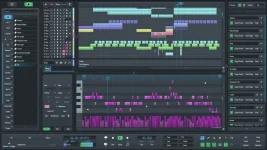
SoundBridge 3.2.0 adds ten interface languages, revised track controls, resizable special tracks, and a webcam self-preview for Virtual Collaboration sessions.
On a basic level, SoundBridge is a good DAW for recording, MIDI work, editing, automation, plug-ins, and mixing without turning every job into a menu hunt. It still feels deliberately smaller than the giant workstations, which is either the appeal or the limitation depending on how much built-in stuff you expect.
The SoundBridge 3.2 collaboration and interface changes improve the everyday side of the program more than the version number suggests. Gain controls sit in more useful places, special tracks can be resized or moved into the scrolling Sequencer area, and cursor scaling finally makes more sense on dense displays.
A SoundBridge MIDI keyboard setup is ordinary in a good way. Connect the controller, enable it in Preferences, choose it as the MIDI input, and load an instrument. SoundBridge VST plugins live in the Plugin Browser and Insert Rack, so third-party instruments and effects matter quite a bit once the stock collection stops covering what you want. Version 3.2 also improves VST scanning stability, scan recovery, plug-in blacklisting, and diagnostic logging. Boring maintenance, maybe, but useful when a paid plug-in vanishes after an update.
SoundBridge instruments are the thinner part of the package. The paid version includes sampler access, while the free tier does not, and the stock effects lean toward practical essentials rather than a giant sound-design playground. Producers who already own plug-ins may barely care. Someone expecting an FL Studio-sized box of toys probably will.
Current SoundBridge system requirements list Windows 10 or 11, 8 GB of RAM, and ASIO-compatible audio hardware on Windows. SoundBridge for Mac currently lists macOS Sonoma 14.0, 8 GB of RAM, and either an Intel Core i5 or Apple Silicon. Older store pages still show much older macOS requirements, so the first-party spec is the safer reference.
SoundBridge DAW pricing moves beyond the free tier through monthly, annual, or lifetime access rather than one mandatory purchase route. The current site also advertises managed STUN and TURN access at $4.99 per month for free-tier users, while lifetime owners can host their own Linux and CoTURN infrastructure. Read the current plan details before buying because the collaboration side now has more moving parts than the old simple free-versus-paid split.
For somebody choosing a SoundBridge alternative mainly on raw feature count, the competition gets uncomfortable fast. The SoundBridge vs Reaper decision, for example, is less about whether either can record and mix and more about whether you value SoundBridge's cleaner layout and integrated remote workflow enough to accept a smaller ecosystem and fewer bundled tools.
Network delay still exists in the real world. Latency in networked music performance is a fundamental technical constraint because musicians are sensitive to timing shifts when trying to synchronize across distance. SoundBridge works around the problem with pre-record buffering, local capture, latency compensation, and transfer after recording instead of pretending the internet has no travel time.
Version 3.2 makes that system less awkward in small but useful ways. Webcam self-preview is now built in, session creation and joining have been refined, transferred audio blocks can mute automatically, and the collaboration lane behaves more like the rest of the Sequencer when resizing or reorganizing a project.
The catch is pretty simple. If remote sessions do nothing for you, SoundBridge remains a clean, capable workstation competing against DAWs with larger communities, deeper bundled instruments, and years of accumulated tutorials. If remote recording is part of your actual work, 3.2 gives SoundBridge a clearer identity than the old pitch of being another lightweight DAW.
On a basic level, SoundBridge is a good DAW for recording, MIDI work, editing, automation, plug-ins, and mixing without turning every job into a menu hunt. It still feels deliberately smaller than the giant workstations, which is either the appeal or the limitation depending on how much built-in stuff you expect.
The SoundBridge 3.2 collaboration and interface changes improve the everyday side of the program more than the version number suggests. Gain controls sit in more useful places, special tracks can be resized or moved into the scrolling Sequencer area, and cursor scaling finally makes more sense on dense displays.
The core DAW stays simple without feeling bare
SoundBridge recording follows the familiar track, arm, monitor, record flow, while the Audio Editor handles fades, gain, pitch work, and time stretching. SoundBridge automation is similarly direct, with dedicated editing rather than a pile of hidden submenus. None of this is exotic, but the workflow is quick to learn.A SoundBridge MIDI keyboard setup is ordinary in a good way. Connect the controller, enable it in Preferences, choose it as the MIDI input, and load an instrument. SoundBridge VST plugins live in the Plugin Browser and Insert Rack, so third-party instruments and effects matter quite a bit once the stock collection stops covering what you want. Version 3.2 also improves VST scanning stability, scan recovery, plug-in blacklisting, and diagnostic logging. Boring maintenance, maybe, but useful when a paid plug-in vanishes after an update.
SoundBridge instruments are the thinner part of the package. The paid version includes sampler access, while the free tier does not, and the stock effects lean toward practical essentials rather than a giant sound-design playground. Producers who already own plug-ins may barely care. Someone expecting an FL Studio-sized box of toys probably will.
Current SoundBridge system requirements list Windows 10 or 11, 8 GB of RAM, and ASIO-compatible audio hardware on Windows. SoundBridge for Mac currently lists macOS Sonoma 14.0, 8 GB of RAM, and either an Intel Core i5 or Apple Silicon. Older store pages still show much older macOS requirements, so the first-party spec is the safer reference.
The free version is useful but definitely restricted
SoundBridge is free with the same 192 kHz engine, but the current free tier stops at 10 tracks. Projects over that limit cannot be saved, sampler access is removed, and Virtual Collaboration is not included in the normal free feature set.SoundBridge DAW pricing moves beyond the free tier through monthly, annual, or lifetime access rather than one mandatory purchase route. The current site also advertises managed STUN and TURN access at $4.99 per month for free-tier users, while lifetime owners can host their own Linux and CoTURN infrastructure. Read the current plan details before buying because the collaboration side now has more moving parts than the old simple free-versus-paid split.
For somebody choosing a SoundBridge alternative mainly on raw feature count, the competition gets uncomfortable fast. The SoundBridge vs Reaper decision, for example, is less about whether either can record and mix and more about whether you value SoundBridge's cleaner layout and integrated remote workflow enough to accept a smaller ecosystem and fewer bundled tools.
Virtual Collaboration is the reason 3.x feels different
SoundBridge Virtual Collaboration is not just a video call glued onto the DAW. It can combine webcam and talkback, remote control, synchronized session behavior, remote audio or MIDI recording, and lossless file transfer inside the project workflow.Network delay still exists in the real world. Latency in networked music performance is a fundamental technical constraint because musicians are sensitive to timing shifts when trying to synchronize across distance. SoundBridge works around the problem with pre-record buffering, local capture, latency compensation, and transfer after recording instead of pretending the internet has no travel time.
Version 3.2 makes that system less awkward in small but useful ways. Webcam self-preview is now built in, session creation and joining have been refined, transferred audio blocks can mute automatically, and the collaboration lane behaves more like the rest of the Sequencer when resizing or reorganizing a project.
The catch is pretty simple. If remote sessions do nothing for you, SoundBridge remains a clean, capable workstation competing against DAWs with larger communities, deeper bundled instruments, and years of accumulated tutorials. If remote recording is part of your actual work, 3.2 gives SoundBridge a clearer identity than the old pitch of being another lightweight DAW.