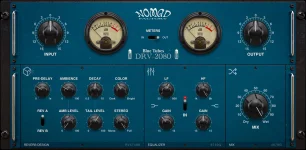
Nomad Factory’s current BlueVerb DRV-2080 page lists independent Ambience and Tail levels alongside adjustable Ambience and Early Reflections. Older BlueVerb documentation makes the division more explicit. Ambiance changes the character of the early reflections, Amount sets their level, and Tail Level controls the sustained reverberation.
The distinction matters because the BlueVerb DRV-2080 ambience controls are not just three ways to make the same reverb louder. You can change the impression at the front of the effect without raising the long decay behind it, or pull the tail down while leaving a short sense of room around the dry sound.
This is useful on sounds that need space without a long wash. A snare, clap, dry guitar, or close vocal can take a noticeable early-reflection field while the Tail Level stays restrained. You hear a surrounding space around the source, but fewer sustained reflections remain to crowd the next hit or syllable.
Do not treat early reflections as a fixed block ending at exactly 80 milliseconds. Acoustic literature often uses 80 ms as a conventional dividing point, but researchers have shown that the transition into late reverberation can vary with the room response. Research on the early-to-late transition proposed a signal-based transition time instead of assuming one universal cutoff.
BlueVerb does not expose that transition as a millisecond boundary you can move directly. Its Ambience controls are musical controls over the early part of the algorithm, not a room-analysis tool. This is a useful limit to remember when translating acoustic terminology into what the knobs actually do.
The difference becomes obvious with long decay values. A six-second decay can remain programmed while Tail Level is pulled back enough to make the sustained wash less dominant. Raising Tail Level makes that same long decay more present without changing the number displayed for RT60.
This separation is handy when a preset has the right timing but the wrong weight. Producers often reach for decay first when a vocal reverb feels too heavy, then accidentally change the rhythmic shape of the effect. BlueVerb gives you another move because the tail’s level can change while the decay time stays put.
Ambience and Tail Level also should not be confused with the global Dry/Wet Mix. Mix changes the relationship between the unprocessed input and the complete reverberated output. The ambience-to-tail balance happens inside the wet effect itself, so two settings can share the same overall Mix value and still have very different internal shapes.
RT60 handles duration, with the current BlueVerb specification running from 0.5 to 10 seconds. Tail Level handles how strongly the sustained part is heard, while Ambience shapes the early-reflection side. Those controls become much easier to set once you stop treating reverb size, reverb length, and reverb level as one combined choice.
A tight drum treatment can use a short pre-delay, audible Ambience, modest Tail Level, and short RT60 without turning into a dry signal. A spacious vocal can use more pre-delay and a longer RT60 while keeping the tail lower than expected, preserving some separation around the words. Neither setup depends on a generic rule saying early reflections must always be louder or the tail must always be longer.
The useful test is to lower Tail Level first and listen to what remains around the dry source. Adjust Ambience until the initial space has the character and strength you want, then bring the tail back only far enough to supply the sustained decay. Change RT60 afterward if the duration itself is wrong, rather than using decay time to solve a level problem.
The distinction matters because the BlueVerb DRV-2080 ambience controls are not just three ways to make the same reverb louder. You can change the impression at the front of the effect without raising the long decay behind it, or pull the tail down while leaving a short sense of room around the dry sound.
Ambience controls the front of the reverb
Early reflections are the first reflected arrivals after the direct sound, before the later field becomes dense enough to read as a continuous decay. BlueVerb’s older manual uses Ambiance for the character of this section and Amount for its level. The current v4 product page keeps the early-reflection idea but describes it more compactly as adjustable Ambience and Early Reflections.This is useful on sounds that need space without a long wash. A snare, clap, dry guitar, or close vocal can take a noticeable early-reflection field while the Tail Level stays restrained. You hear a surrounding space around the source, but fewer sustained reflections remain to crowd the next hit or syllable.
Do not treat early reflections as a fixed block ending at exactly 80 milliseconds. Acoustic literature often uses 80 ms as a conventional dividing point, but researchers have shown that the transition into late reverberation can vary with the room response. Research on the early-to-late transition proposed a signal-based transition time instead of assuming one universal cutoff.
BlueVerb does not expose that transition as a millisecond boundary you can move directly. Its Ambience controls are musical controls over the early part of the algorithm, not a room-analysis tool. This is a useful limit to remember when translating acoustic terminology into what the knobs actually do.
Tail Level changes the sustained decay
Tail Level is separate from decay time. BlueVerb’s legacy manual defines Tail Level as the level of the classic reverberation, while Decay RT60 sets how long that reverberation takes to decay. Turning the tail down therefore does not mean you have shortened the RT60 setting.The difference becomes obvious with long decay values. A six-second decay can remain programmed while Tail Level is pulled back enough to make the sustained wash less dominant. Raising Tail Level makes that same long decay more present without changing the number displayed for RT60.
This separation is handy when a preset has the right timing but the wrong weight. Producers often reach for decay first when a vocal reverb feels too heavy, then accidentally change the rhythmic shape of the effect. BlueVerb gives you another move because the tail’s level can change while the decay time stays put.
Ambience and Tail Level also should not be confused with the global Dry/Wet Mix. Mix changes the relationship between the unprocessed input and the complete reverberated output. The ambience-to-tail balance happens inside the wet effect itself, so two settings can share the same overall Mix value and still have very different internal shapes.
Pre-delay and RT60 still do different jobs
Pre-delay controls when the reverberant effect begins, with BlueVerb offering up to roughly one second. It does not replace the Ambience control, and it does not determine the Tail Level. A longer pre-delay can leave more clean space after a transient before reflected energy arrives, while the balance between early and sustained energy remains a separate decision.RT60 handles duration, with the current BlueVerb specification running from 0.5 to 10 seconds. Tail Level handles how strongly the sustained part is heard, while Ambience shapes the early-reflection side. Those controls become much easier to set once you stop treating reverb size, reverb length, and reverb level as one combined choice.
A tight drum treatment can use a short pre-delay, audible Ambience, modest Tail Level, and short RT60 without turning into a dry signal. A spacious vocal can use more pre-delay and a longer RT60 while keeping the tail lower than expected, preserving some separation around the words. Neither setup depends on a generic rule saying early reflections must always be louder or the tail must always be longer.
The useful test is to lower Tail Level first and listen to what remains around the dry source. Adjust Ambience until the initial space has the character and strength you want, then bring the tail back only far enough to supply the sustained decay. Change RT60 afterward if the duration itself is wrong, rather than using decay time to solve a level problem.