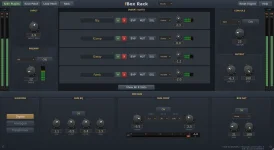
Every fBox processor instance receives its own serial number, and the serial determines small modeled differences in how that unit behaves. Load two copies with identical controls, and they are intended to remain the same model while responding a little differently.
The interesting part is not randomness for its own sake. It is what happens once you find one unit that works unusually well on a source and want the exact same character back tomorrow, next month, or after the project has been moved to another stage of the mix.
With the fBox Audio Windows studio, the serial system becomes something you manage rather than something you merely notice. You can roll another unit, save one you like, or pin a favorite so new instances open with that character.
Virtual analog modeling normally tries to reproduce the behavior of a circuit in software. Exact component values matter when matching one physical example closely, a limitation addressed directly in differentiable white-box virtual analog modeling.
fBox applies the idea across different processors rather than adding one generic random tone control. Two fComp instances can differ in timing and saturation behavior. Two fEq units can place the same boost a little differently, while Rack can carry its unit character through several stages of the signal path.
Console takes the idea further because one serial belongs to a whole desk. Its character reaches across channels, buses, the master section, and tape tracks, so rolling a new Console is closer to changing the desk personality than swapping one isolated effect.
Do not start with six processors, automation, and a loud master chain. A compressor on drums, saturation on bass, or an EQ boost on a steady source makes the comparison easier because you can listen for one behavior at a time instead of trying to identify a tiny difference inside a moving target.
Compression is especially revealing when the detector is working hard enough to show its personality. One unit may let the leading edge through slightly differently or recover in a way you prefer, while another can feel a little denser at the same nominal control positions.
Once one unit wins, stop rolling. Save it or pin it before continuing the mix, because endless regeneration turns a useful variation system into preset browsing with nicer plumbing. The point is to find a character that helps the source and then get back to making the record.
A pinned unit also makes repeatable starting points easier. If one fPre character consistently works on vocals, opening future instances with that unit removes one variable, while you can still deliberately roll something new when a guitar, drum bus, or synth needs a different edge.
Keep the move subtle. Different nonlinear behavior, timing, or frequency response between channels can widen the impression, but large mismatches can also pull the image sideways or make the balance change when the signal is collapsed to mono.
Gain matching matters here more than people expect. If the left unit simply comes back louder, your brain can interpret level as character, and the comparison becomes useless. Match output first, then judge width, punch, tone, and center stability.
Session recall is the final part of the system. The serial is meant to return with the saved project, so a compressor you chose for its particular behavior should not silently become a different unit when the session reopens. Saving or pinning a favorite serves a different job because it gives you a reusable unit outside that one project.
For important mixes, keep the chosen serials stable once decisions depend on them. Rolling a fresh compressor after vocal automation, bus balancing, or mastering moves can change the interaction enough to force unnecessary rechecking, even when every visible knob still shows the same value.
The interesting part is not randomness for its own sake. It is what happens once you find one unit that works unusually well on a source and want the exact same character back tomorrow, next month, or after the project has been moved to another stage of the mix.
With the fBox Audio Windows studio, the serial system becomes something you manage rather than something you merely notice. You can roll another unit, save one you like, or pin a favorite so new instances open with that character.
Serial variation is part of the model
Real analog hardware does not leave a production line as a row of mathematically identical boxes. Component values sit inside tolerances, calibration drifts, nonlinear parts differ, and two nominally identical units can respond differently when pushed.Virtual analog modeling normally tries to reproduce the behavior of a circuit in software. Exact component values matter when matching one physical example closely, a limitation addressed directly in differentiable white-box virtual analog modeling.
fBox applies the idea across different processors rather than adding one generic random tone control. Two fComp instances can differ in timing and saturation behavior. Two fEq units can place the same boost a little differently, while Rack can carry its unit character through several stages of the signal path.
Console takes the idea further because one serial belongs to a whole desk. Its character reaches across channels, buses, the master section, and tape tracks, so rolling a new Console is closer to changing the desk personality than swapping one isolated effect.
Audition different units with boring settings first
The cleanest way to hear a serial difference is to remove as many other variables as possible. Duplicate a processor, copy the settings exactly, level-match the results, then switch between the units on a short loop you already know well.Do not start with six processors, automation, and a loud master chain. A compressor on drums, saturation on bass, or an EQ boost on a steady source makes the comparison easier because you can listen for one behavior at a time instead of trying to identify a tiny difference inside a moving target.
Compression is especially revealing when the detector is working hard enough to show its personality. One unit may let the leading edge through slightly differently or recover in a way you prefer, while another can feel a little denser at the same nominal control positions.
Once one unit wins, stop rolling. Save it or pin it before continuing the mix, because endless regeneration turns a useful variation system into preset browsing with nicer plumbing. The point is to find a character that helps the source and then get back to making the record.
A pinned unit also makes repeatable starting points easier. If one fPre character consistently works on vocals, opening future instances with that unit removes one variable, while you can still deliberately roll something new when a guitar, drum bus, or synth needs a different edge.
Stereo tricks need a mono check
The developer has suggested using two differently serialized instances with matching settings on left and right paths to create small differences between the channels. With processors such as EQ or saturation, the result can make a stereo signal feel less perfectly mirrored without requiring obvious modulation.Keep the move subtle. Different nonlinear behavior, timing, or frequency response between channels can widen the impression, but large mismatches can also pull the image sideways or make the balance change when the signal is collapsed to mono.
Gain matching matters here more than people expect. If the left unit simply comes back louder, your brain can interpret level as character, and the comparison becomes useless. Match output first, then judge width, punch, tone, and center stability.
Session recall is the final part of the system. The serial is meant to return with the saved project, so a compressor you chose for its particular behavior should not silently become a different unit when the session reopens. Saving or pinning a favorite serves a different job because it gives you a reusable unit outside that one project.
For important mixes, keep the chosen serials stable once decisions depend on them. Rolling a fresh compressor after vocal automation, bus balancing, or mastering moves can change the interaction enough to force unnecessary rechecking, even when every visible knob still shows the same value.