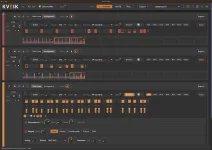
KVEIK 1.2 added 15 groove templates that alter both note timing and velocity, with the groove controls applied independently to each track. The set includes MPC-style swings, Logic 8 swing, Dilla-style movement, tight funk, and humanized options rather than one global shuffle amount.
The distinction matters because groove is rarely just a question of moving notes off the grid. Inside KVEIK's per-track groove controls, a template can change timing and attack strength while another track keeps a different feel.
This makes a practical difference on drum parts. Two patterns with identical note positions can feel different once one gives stronger weight to selected hits and shifts others around the beat. Your ear receives a new pattern of emphasis as well as a new pattern of arrival times.
The per-track design is the more useful part. You can let hi-hats lean into one groove while the kick stays firmer. Percussion can take a looser profile without forcing the bass track to copy it.
This also stops groove from becoming a project-wide preset. A busy top line may benefit from obvious movement while a sparse kick needs very little adjustment. KVEIK lets those decisions stay separate instead of reducing the whole arrangement to one swing percentage.
Research gives a good reason to avoid treating larger offsets as automatically better. Studies of timing and perceived groove found that regular pulse, event density, syncopation, and other rhythmic cues can matter greatly. Microtiming by itself did not reliably predict stronger groove.
The useful reading is simple. A groove template gives you a coordinated starting shape, but the displacement still needs to suit the part. Moving farther from the grid is not a prize in itself.
KVEIK includes a velocity compressor per block for this kind of cleanup. You can narrow the dynamic range or raise quieter hits without pushing the loudest ones by the same amount. Offset changes can also move the overall level while retaining internal variation.
This is useful after choosing a groove whose timing already feels right. If its accent profile hits a particular drum kit too hard, you do not need to abandon the pattern. The velocity range can be reshaped without redrawing every step.
A better approach is to separate the decisions. Keep the timing profile you like, then adjust the velocity range until ghost notes and main accents sit comfortably. The instrument you are driving should decide where those useful velocity ranges actually fall.
The same logic helps when moving one pattern between several drum plugins. Receiving instruments may map velocity to sample layers, filters, envelopes, or amplitude in very different ways. A pattern that felt balanced yesterday can sound lopsided after a kit change even though the MIDI values never moved.
This becomes useful when extra micro-shift values sit on a track that already has a strong groove character. A late snare might feel right while one or two manually shifted hats simply sit too far from the beat.
Pulling the largest Shift values inward keeps smaller deviations available without treating every offset as equally wrong. You are controlling one layer of timing rather than flattening the entire pattern.
Humanize sits beside these tools, but it solves a different problem. Templates provide a designed timing and velocity profile, while humanize adds variation. Stacking both carelessly can turn a clear rhythmic idea into a fuzzy one.
Start with the template on the track that needs the strongest identity, then listen to velocity before touching anything else. Adjust the dynamic range if the accents are wrong. Use Shift compression when individual timing values stick out, and add humanize only when the remaining repetition actually sounds mechanical.
A kick can stay comparatively straight while hats use a lazy profile and percussion carries a lighter human feel. Each track keeps its own pocket even though all of them still share the same bar line.
The distinction matters because groove is rarely just a question of moving notes off the grid. Inside KVEIK's per-track groove controls, a template can change timing and attack strength while another track keeps a different feel.
Groove templates carry timing and velocity together
Apply a groove to hi-hats, and you are not simply delaying every second step by the same amount. KVEIK's templates include their own timing and velocity profiles, so the accents can change along with the placement of the notes.This makes a practical difference on drum parts. Two patterns with identical note positions can feel different once one gives stronger weight to selected hits and shifts others around the beat. Your ear receives a new pattern of emphasis as well as a new pattern of arrival times.
The per-track design is the more useful part. You can let hi-hats lean into one groove while the kick stays firmer. Percussion can take a looser profile without forcing the bass track to copy it.
This also stops groove from becoming a project-wide preset. A busy top line may benefit from obvious movement while a sparse kick needs very little adjustment. KVEIK lets those decisions stay separate instead of reducing the whole arrangement to one swing percentage.
Research gives a good reason to avoid treating larger offsets as automatically better. Studies of timing and perceived groove found that regular pulse, event density, syncopation, and other rhythmic cues can matter greatly. Microtiming by itself did not reliably predict stronger groove.
The useful reading is simple. A groove template gives you a coordinated starting shape, but the displacement still needs to suit the part. Moving farther from the grid is not a prize in itself.
Velocity shaping changes how the same groove speaks
Velocity deserves equal attention because different instruments respond differently to the same MIDI values. A velocity of 70 may sound mild on one drum instrument and trigger a much brighter sample layer on another. Moving the same groove between kits can therefore change tone as well as loudness.KVEIK includes a velocity compressor per block for this kind of cleanup. You can narrow the dynamic range or raise quieter hits without pushing the loudest ones by the same amount. Offset changes can also move the overall level while retaining internal variation.
This is useful after choosing a groove whose timing already feels right. If its accent profile hits a particular drum kit too hard, you do not need to abandon the pattern. The velocity range can be reshaped without redrawing every step.
A better approach is to separate the decisions. Keep the timing profile you like, then adjust the velocity range until ghost notes and main accents sit comfortably. The instrument you are driving should decide where those useful velocity ranges actually fall.
The same logic helps when moving one pattern between several drum plugins. Receiving instruments may map velocity to sample layers, filters, envelopes, or amplitude in very different ways. A pattern that felt balanced yesterday can sound lopsided after a kit change even though the MIDI values never moved.
Shift compression keeps extra timing under control
Version 1.2.1 added a compressor for the Shift lane, giving manually edited or imported microtiming its own range control. Instead of snapping every displaced note toward the grid, you can reduce larger Shift values while preserving smaller timing differences.This becomes useful when extra micro-shift values sit on a track that already has a strong groove character. A late snare might feel right while one or two manually shifted hats simply sit too far from the beat.
Pulling the largest Shift values inward keeps smaller deviations available without treating every offset as equally wrong. You are controlling one layer of timing rather than flattening the entire pattern.
Humanize sits beside these tools, but it solves a different problem. Templates provide a designed timing and velocity profile, while humanize adds variation. Stacking both carelessly can turn a clear rhythmic idea into a fuzzy one.
Start with the template on the track that needs the strongest identity, then listen to velocity before touching anything else. Adjust the dynamic range if the accents are wrong. Use Shift compression when individual timing values stick out, and add humanize only when the remaining repetition actually sounds mechanical.
A kick can stay comparatively straight while hats use a lazy profile and percussion carries a lighter human feel. Each track keeps its own pocket even though all of them still share the same bar line.