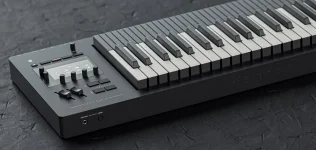
Osmose firmware 2.3 adds a dedicated DAW Control mode while keeping External MIDI and the internal sound engine available alongside it. Official documentation says these modes run in parallel, so changing the screen you are working in does not turn off the other path.
The firmware 2.3 DAW control and Ctrl-E update matters because it changes the job of the keyboard inside a session. Transport, track navigation, and mixer moves belong to DAW Control, while notes and expressive gestures still need the musical MIDI route.
For a clean Osmose MIDI setup, think in routes rather than menus. The Play connection carries performance data to plugins or hardware; the sound-engine connection is for recording and returning the internal EaganMatrix performance; and DAW Control handles host commands. If ports, channels, and tracks start blurring together, MIDI ports, channels, and tracks do different jobs is the useful distinction.
An Osmose MIDI port can therefore be alive without being the right port for the task. Transport buttons working while a synth track stays silent usually point toward control-surface routing, track input, monitoring, or plugin setup rather than a dead keyboard. A MIDI keyboard connects cleanly to your computer, and a DAW gives a practical way to isolate those layers without randomly reinstalling software.
The internal synthesizer is a different case. Firmware 2.3 documentation says USB MIDI Port 2 is now the sound-engine route, and the Haken local-control option can be switched off when you want the DAW to sit between the keybed and EaganMatrix. With local control off, the armed or monitored DAW track becomes part of the signal path, which is easy to miss if you expect the Osmose to sound directly.
Pitch range is the first thing worth checking when expression feels exaggerated or barely moves. Expressive E notes that many MPE synths use a maximum note-bend range of plus or minus 48 semitones and lets you scale the Osmose bending fraction to get a smaller physical gesture. Most MPE problems start with a bend range mismatch explains why controller and synth settings have to agree before any Osmose MIDI CC remapping makes sense.
An Osmose MIDI channel setting becomes more important when the plugin is not truly MPE-aware. Classic MIDI can still give you velocity and global expression, while multichannel setups can spread notes across channels for older multitimbral instruments. An Osmose Kontakt setup may therefore need several receiving parts rather than one MPE-ready patch. Expressive E also documents non-MPE fallbacks, so using Osmose as a keyboard controller does not require every instrument in your library to speak MPE.
The same basic split applies to Osmose in Logic Pro, Osmose in Cubase, and Bitwig. Each host exposes MPE differently, but the musical input and the host-control layer remain separate jobs. Cubase adds its Note Expression workflow, while Logic and Live present their own routing and editing choices. The useful habit is to get one expressive instrument track working before adding remote control, sync, macros, or extra Osmose MIDI out paths.
Osmose program change messages belong to instrument and preset control rather than transport. Keeping them on the performance side of the setup prevents a control-surface problem from turning into a whole-session routing hunt. If you move an MPE performance outside the project, test the result before deleting the original because standard MIDI files can drop per-note expression when an export path collapses its channel structure.
The firmware 2.3 DAW control and Ctrl-E update matters because it changes the job of the keyboard inside a session. Transport, track navigation, and mixer moves belong to DAW Control, while notes and expressive gestures still need the musical MIDI route.
For a clean Osmose MIDI setup, think in routes rather than menus. The Play connection carries performance data to plugins or hardware; the sound-engine connection is for recording and returning the internal EaganMatrix performance; and DAW Control handles host commands. If ports, channels, and tracks start blurring together, MIDI ports, channels, and tracks do different jobs is the useful distinction.
Keep control data separate from performance MIDI
Using Osmose as an MPE controller starts with the Play port. Expressive E identifies USB MIDI Port 1 as the route for external instruments, and current documentation keeps External MIDI settings independent from DAW Control. The channel behavior comes from the MIDI Polyphonic Expression specification, which carries per-note expression through ordinary MIDI messages distributed across member channels rather than one keyboard-wide stream.An Osmose MIDI port can therefore be alive without being the right port for the task. Transport buttons working while a synth track stays silent usually point toward control-surface routing, track input, monitoring, or plugin setup rather than a dead keyboard. A MIDI keyboard connects cleanly to your computer, and a DAW gives a practical way to isolate those layers without randomly reinstalling software.
The internal synthesizer is a different case. Firmware 2.3 documentation says USB MIDI Port 2 is now the sound-engine route, and the Haken local-control option can be switched off when you want the DAW to sit between the keybed and EaganMatrix. With local control off, the armed or monitored DAW track becomes part of the signal path, which is easy to miss if you expect the Osmose to sound directly.
Match MPE behavior before tweaking mappings
The Osmose MIDI settings can send MPE, classic MIDI, or multichannel behavior depending on what the receiving instrument understands. In normal MPE use, a note can carry its own pitch bend, pressure, and CC74-style timbre movement. Expressive E maps Osmose Initial Pressure to MPE pressure and its aftertouch axis to CC74 for compatible plugins.Pitch range is the first thing worth checking when expression feels exaggerated or barely moves. Expressive E notes that many MPE synths use a maximum note-bend range of plus or minus 48 semitones and lets you scale the Osmose bending fraction to get a smaller physical gesture. Most MPE problems start with a bend range mismatch explains why controller and synth settings have to agree before any Osmose MIDI CC remapping makes sense.
An Osmose MIDI channel setting becomes more important when the plugin is not truly MPE-aware. Classic MIDI can still give you velocity and global expression, while multichannel setups can spread notes across channels for older multitimbral instruments. An Osmose Kontakt setup may therefore need several receiving parts rather than one MPE-ready patch. Expressive E also documents non-MPE fallbacks, so using Osmose as a keyboard controller does not require every instrument in your library to speak MPE.
Treat each DAW as a routing variation
An Osmose Ableton setup still needs the Play port enabled for track input and MPE, even when DAW Control is already responding. Expressive E's current Ableton notes also warn that firmware 2.3 reworked the USB port roles, with Port 2 appearing as the sound-engine port on macOS, so older screenshots can be more confusing than helpful.The same basic split applies to Osmose in Logic Pro, Osmose in Cubase, and Bitwig. Each host exposes MPE differently, but the musical input and the host-control layer remain separate jobs. Cubase adds its Note Expression workflow, while Logic and Live present their own routing and editing choices. The useful habit is to get one expressive instrument track working before adding remote control, sync, macros, or extra Osmose MIDI out paths.
Osmose program change messages belong to instrument and preset control rather than transport. Keeping them on the performance side of the setup prevents a control-surface problem from turning into a whole-session routing hunt. If you move an MPE performance outside the project, test the result before deleting the original because standard MIDI files can drop per-note expression when an export path collapses its channel structure.