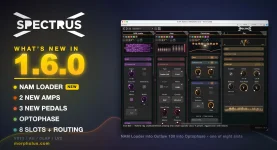
Spectrus 1.6.0 can load .nam captures, browse a folder with click-free crossfades, and default to one mono processing pass to cut CPU use. The browser also remembers the last folder you opened, so a large third-party NAM library does not need rebuilding inside Spectrus every session. Folder stepping matters because auditioning several captures becomes a normal listening job instead of repeated file-dialog work.
The practical value of Spectrus NAM capture support starts with knowing what a capture contains. A .nam file can represent an amp, a pedal, or a fuller recorded chain, while Spectrus ships 21 factory captures that are deliberately amp-only.
Prev and Next walk through the rest of the selected folder rather than a curated internal database. Each change crossfades, and the Neural Rack display redraws the loaded file's actual network structure, giving you quick visual confirmation when filenames are cryptic.
Width only works while Mono is active. It spreads the processed result across stereo while remaining mono-compatible, so folding the output down returns the plain mono signal. Disable Mono and Width becomes inert, while left and right run through independent capture instances instead.
Input level deserves the same attention because a .nam capture reflects the device at its recorded level and settings. Push NAM Loader's Input control, and you can drive the model harder, while Output only trims what comes afterward. The broader idea behind real-time neural guitar amp modeling is nonlinear signal recreation, so gain staging is sonically important rather than mere level management.
The distinction matters in mixed NAM capture libraries. One folder can contain files with usable loudness data alongside captures with none, so Normalize may level some while leaving others untouched. If one capture suddenly arrives much louder, the file metadata is a sensible first place to look.
Full and Lite are also file-dependent. Lite appears only when a capture embeds a trained reduced-size network alongside the full one, while ordinary single-network captures stay in Full. Switching modes rebuilds the NAM engine, so Spectrus does not expose Quality as an automatable control for flipping during playback.
This is different from a generic lower-quality switch. Spectrus is not simply stripping arbitrary detail from every loaded capture when Lite is selected. The smaller network must already exist inside the file, which leaves the capture creator responsible for whether that CPU-saving option is available.
Spectrus gives all 21 factory NAM files a clear role. They capture the amp stage without the speaker cabinet, so running one alone is not the same as loading a finished miked-guitar chain. Put a Cabinet module after NAM Loader, or use an appropriate cabinet IR elsewhere in the signal path.
The built-in files also live on disk rather than being locked inside the plugin. You can open them in another NAM host, and Spectrus restores a supplied factory capture on the next launch if it gets deleted or modified. Your own third-party files do not receive the same automatic restoration.
High-gain captures bring another detail worth noticing. Spectrus places its gate after the capture, but the detector follows the signal entering the capture. The arrangement lets the cleaner incoming performance control a gate that suppresses hiss and noise created by the modeled stage.
Bass, Mid, and Treble also sit after the capture, with up to 12 dB of adjustment in either direction. Pushing those controls hard EQ's the captured output instead of making the neural model behave as though the original amplifier knobs had moved.
The practical value of Spectrus NAM capture support starts with knowing what a capture contains. A .nam file can represent an amp, a pedal, or a fuller recorded chain, while Spectrus ships 21 factory captures that are deliberately amp-only.
Prev and Next walk through the rest of the selected folder rather than a curated internal database. Each change crossfades, and the Neural Rack display redraws the loaded file's actual network structure, giving you quick visual confirmation when filenames are cryptic.
Mono mode cuts NAM Loader CPU without losing compatibility
Most guitar DI tracks are mono, and Spectrus treats them that way by default. With Mono switched on, NAM Loader sums the input, runs one capture instance, then feeds both outputs from the same pass. This uses half the CPU of its dual-mono mode.Width only works while Mono is active. It spreads the processed result across stereo while remaining mono-compatible, so folding the output down returns the plain mono signal. Disable Mono and Width becomes inert, while left and right run through independent capture instances instead.
Input level deserves the same attention because a .nam capture reflects the device at its recorded level and settings. Push NAM Loader's Input control, and you can drive the model harder, while Output only trims what comes afterward. The broader idea behind real-time neural guitar amp modeling is nonlinear signal recreation, so gain staging is sonically important rather than mere level management.
Normalize and Lite depend on what the file contains
Normalize is more specific than a normal loudness-matching switch. Spectrus reads loudness metadata stored inside the .nam file and uses it to even out level differences while you browse. Files without that metadata simply pass at unity, with no automatic guess replacing the missing information.The distinction matters in mixed NAM capture libraries. One folder can contain files with usable loudness data alongside captures with none, so Normalize may level some while leaving others untouched. If one capture suddenly arrives much louder, the file metadata is a sensible first place to look.
Full and Lite are also file-dependent. Lite appears only when a capture embeds a trained reduced-size network alongside the full one, while ordinary single-network captures stay in Full. Switching modes rebuilds the NAM engine, so Spectrus does not expose Quality as an automatable control for flipping during playback.
This is different from a generic lower-quality switch. Spectrus is not simply stripping arbitrary detail from every loaded capture when Lite is selected. The smaller network must already exist inside the file, which leaves the capture creator responsible for whether that CPU-saving option is available.
Amp-only captures still need the rest of the rig
The factory pack is broader than one take of each modeled amp. Spectrus includes two or three captures from each of its seven amp families, plus five Amp Lab hybrid rigs. Matching factory presets make those captures easier to audition inside a complete signal chain.Spectrus gives all 21 factory NAM files a clear role. They capture the amp stage without the speaker cabinet, so running one alone is not the same as loading a finished miked-guitar chain. Put a Cabinet module after NAM Loader, or use an appropriate cabinet IR elsewhere in the signal path.
The built-in files also live on disk rather than being locked inside the plugin. You can open them in another NAM host, and Spectrus restores a supplied factory capture on the next launch if it gets deleted or modified. Your own third-party files do not receive the same automatic restoration.
High-gain captures bring another detail worth noticing. Spectrus places its gate after the capture, but the detector follows the signal entering the capture. The arrangement lets the cleaner incoming performance control a gate that suppresses hiss and noise created by the modeled stage.
Bass, Mid, and Treble also sit after the capture, with up to 12 dB of adjustment in either direction. Pushing those controls hard EQ's the captured output instead of making the neural model behave as though the original amplifier knobs had moved.