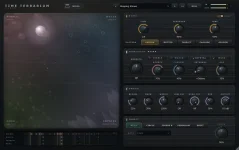
Time Terrarium’s Pattern control gives each of its four habitats a different multiple of the main echo time.
The important bit is that Pattern does not replace the Time control. Time still sets the basic delay value, while Pattern scales that value differently across the four habitats. In Time Terrarium’s four-habitat delay, the available modes are Unison, Dotted, Triplet, Cascade, and Golden.
Unison is the clean baseline because every habitat uses the same echo time. Switch to one of the other modes and the four lanes start separating into different rhythmic positions. Pattern changes when each habitat answers, while the orb routes fresh audio between the four habitats, so moving the orb will not undo a timing pattern you created here.
Triplet works on the same idea with ×1, ×⅔, ×1⅓, and ×2. Set the main delay to a quarter note and the four times become one beat, two-thirds of a beat, four-thirds of a beat, and two beats. The point is not the labels so much as the proportional spacing. Change the main Time value and the whole shape scales with it.
This makes Dotted and Triplet useful when a straight synced delay feels too square, but you still want the repeats tied closely to the song. The four habitats do not become random. They keep fixed relationships to the main echo time, so slowing or speeding the base value preserves the rhythmic structure instead of rebuilding it from scratch.
The ear can also fuse competing pulse streams more readily than the screen suggests. A recent review of polyrhythm perception found that polyrhythms are often heard as integrated patterns rather than totally separate streams. In practice, a busy-looking set of habitat lanes can still land as one groove once the source and feedback are restrained.
This spread is useful when you want the four habitats to stop feeling like slightly shifted copies of each other. Short repeats can keep movement near the source while the longer habitats leave larger gaps. Feedback matters a lot here because high settings can fill those gaps quickly and turn a clear staircase into a dense tail.
Golden is the odd one. 23DSP describes its four times as spaced by the golden ratio, which is irrational, so the lanes do not settle into the neat shared alignment you get from simple binary or triplet relationships. It feels less grid-like because the timing relationships resist the obvious little cycle your ear expects from Unison or Cascade.
You do not need to treat Golden as a chaos button. Lower feedback lets you hear the unusual spacing without stacking too many generations of repeats. The habitat lanes are especially useful here because they show the repeat positions a single note would create before you start feeding a full phrase into the plug-in.
Once the rhythm works, start putting the motion back. Migrate can send later repeats into neighboring habitats while Pattern gives those habitats different echo-time multiples, so character and timing can both evolve across later passes. Orb movement adds another change by altering where new sounds enter, which can make a simple Pattern feel much busier without touching its actual multipliers.
The lanes under the glass are the quickest sanity check. Each lane shows what a single note would produce with the current settings, and the Pattern multiple appears beside the habitat name. If a patch feels messy, look there before changing five controls at once.
A practical order is main Time first, Pattern second, Feedback third. Add Migrate and orb motion only after the basic pulse makes sense. It is less glamorous than hitting Roll until something cool happens, but you can actually tell which control made the groove work.
The important bit is that Pattern does not replace the Time control. Time still sets the basic delay value, while Pattern scales that value differently across the four habitats. In Time Terrarium’s four-habitat delay, the available modes are Unison, Dotted, Triplet, Cascade, and Golden.
Unison is the clean baseline because every habitat uses the same echo time. Switch to one of the other modes and the four lanes start separating into different rhythmic positions. Pattern changes when each habitat answers, while the orb routes fresh audio between the four habitats, so moving the orb will not undo a timing pattern you created here.
Dotted and Triplet turn one time into four pulses
Dotted uses four multipliers across the habitats. They are ×1, ×0.75, ×1.5, and ×2. If the main Time value is a quarter note, those relationships work out to quarter-note, dotted-eighth, dotted-quarter, and half-note spacing. One knob setting suddenly gives you four related clocks without manually programming four taps.Triplet works on the same idea with ×1, ×⅔, ×1⅓, and ×2. Set the main delay to a quarter note and the four times become one beat, two-thirds of a beat, four-thirds of a beat, and two beats. The point is not the labels so much as the proportional spacing. Change the main Time value and the whole shape scales with it.
This makes Dotted and Triplet useful when a straight synced delay feels too square, but you still want the repeats tied closely to the song. The four habitats do not become random. They keep fixed relationships to the main echo time, so slowing or speeding the base value preserves the rhythmic structure instead of rebuilding it from scratch.
The ear can also fuse competing pulse streams more readily than the screen suggests. A recent review of polyrhythm perception found that polyrhythms are often heard as integrated patterns rather than totally separate streams. In practice, a busy-looking set of habitat lanes can still land as one groove once the source and feedback are restrained.
Cascade and Golden pull the habitats further apart
Cascade is more extreme. Its multipliers are ×1, ×0.5, ×2, and ×4, so the slowest habitat can sit eight times farther apart than the fastest one. With a quarter-note base, one habitat fires at an eighth note while another stretches to a whole note. The other two sit at quarter-note and half-note spacing.This spread is useful when you want the four habitats to stop feeling like slightly shifted copies of each other. Short repeats can keep movement near the source while the longer habitats leave larger gaps. Feedback matters a lot here because high settings can fill those gaps quickly and turn a clear staircase into a dense tail.
Golden is the odd one. 23DSP describes its four times as spaced by the golden ratio, which is irrational, so the lanes do not settle into the neat shared alignment you get from simple binary or triplet relationships. It feels less grid-like because the timing relationships resist the obvious little cycle your ear expects from Unison or Cascade.
You do not need to treat Golden as a chaos button. Lower feedback lets you hear the unusual spacing without stacking too many generations of repeats. The habitat lanes are especially useful here because they show the repeat positions a single note would create before you start feeding a full phrase into the plug-in.
Pattern stays readable when the routing stays simple
The easiest way to hear a Pattern mode is to remove a few moving parts first. Park the orb, keep Migrate near the center, use modest feedback, then switch between Unison and the mode you actually want to study. The timing difference becomes obvious fast.Once the rhythm works, start putting the motion back. Migrate can send later repeats into neighboring habitats while Pattern gives those habitats different echo-time multiples, so character and timing can both evolve across later passes. Orb movement adds another change by altering where new sounds enter, which can make a simple Pattern feel much busier without touching its actual multipliers.
The lanes under the glass are the quickest sanity check. Each lane shows what a single note would produce with the current settings, and the Pattern multiple appears beside the habitat name. If a patch feels messy, look there before changing five controls at once.
A practical order is main Time first, Pattern second, Feedback third. Add Migrate and orb motion only after the basic pulse makes sense. It is less glamorous than hitting Roll until something cool happens, but you can actually tell which control made the groove work.